
Customer Relationship Management Tools: A Canadian Buyer's Guide
A customer relationship management tool is the system of record for everyone your organization sells to and serves. This guide covers what the main options cost a Canadian buyer as of August 2026, where those prices come from, and the costs that sit outside the pricing page. If you are still deciding whether you need one at all, start with what a CRM actually is instead.
TL;DR
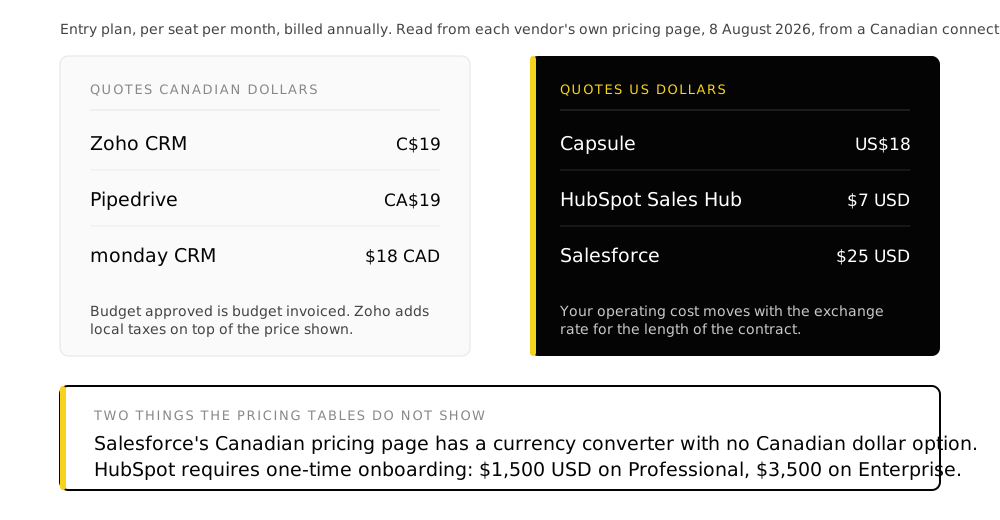
- Three of the six major vendors do not quote Canadian buyers in Canadian dollars. Salesforce's own Canadian pricing page has a currency converter that does not offer CAD at all.
- HubSpot's Professional and Enterprise tiers carry a required one-time onboarding fee of $1,500 and $3,500 USD. It is a footnote on their pricing page and it is absent from every comparison table.
- Cheapest per seat: Zoho CRM at C$19. Free for 3 users. Most expensive mainstream option: Salesforce Enterprise at $175 USD.
- The licence is not the cost. Configuration, data migration and the work after go-live are usually larger than the first year of licensing, whichever tool you pick.
- Pick the tool last. The decision that determines whether this works is what your sales process actually is, and no vendor can answer that for you.
Everything priced below was read from each vendor’s own pricing page on 8 August 2026, loaded from a Canadian connection. That method matters more than it sounds, and the next section explains why.
Prices in this category are not what they appear
Three things make published CRM pricing misleading for a Canadian buyer, and all three are verifiable rather than a matter of opinion.
The same vendor URL returns different currencies and different numbers depending on the country the request comes from. A comparison article written from the wrong place quotes prices no Canadian buyer will ever be shown.
Three of the six vendors below bill Canadian customers in US dollars. Your actual cost then moves with the exchange rate, and the budget you approved in January is not the invoice you get in November.
HubSpot's required onboarding fee is real, is not optional, and appears below the pricing table in smaller type. On a small team it can exceed the first several months of licensing.
Nearly every price shown by default assumes you commit to a year up front. Month-to-month is routinely 15 to 25 percent higher, which is the actual number if you are not ready to sign a year.
What each tool costs a Canadian buyer
Quoted in Canadian dollars
| Tool | Entry plan | Mid plan | Top published plan | Free tier |
|---|---|---|---|---|
| Zoho CRM | C$19 Standard | C$31 Professional | C$65 Ultimate | 3 users |
| Pipedrive | CA$19 Lite | CA$49 Growth | CA$109 Ultimate | No, 14-day trial |
| monday CRM | $18 CAD Basic | $23 CAD Standard | $39 CAD Pro | No |
Per user per month, billed annually. Zoho notes separately that local taxes are charged in addition to the prices shown.
Quoted in US dollars
| Tool | Entry plan | Mid plan | Top published plan | Free tier |
|---|---|---|---|---|
| Capsule | US$18 Starter | US$36 Growth | US$54 Advanced | 2 users, 250 contacts |
| HubSpot Sales Hub | $7 Starter | $90 Professional | $150 Enterprise | 2 users |
| Salesforce | $25 Starter Suite | $100 Pro Suite | $175 Enterprise | No |
Per user or seat per month, billed annually, in USD. HubSpot’s Starter figure is a promotional rate against a $20 standard price.
The two numbers that are not in either table
HubSpot Sales Hub Professional requires a one-time onboarding fee of $1,500 USD. Enterprise requires $3,500 USD. Both are stated on HubSpot's pricing page as required, not optional. For a five-seat Professional deployment the onboarding fee alone is roughly a third of the first year's licensing, and no per-seat comparison will show it to you.
That is worth stating plainly, because it is the single largest difference between these options for a buyer in Canada and it has nothing to do with features. Choosing Salesforce or HubSpot means accepting an operating cost denominated in a currency you do not earn revenue in. Over a three-year commitment on a twenty-seat deployment, exchange rate movement is a larger variable than the difference between two vendors’ mid-tier plans.
Which one fits which situation
Feature lists converge. Every tool here manages contacts, deals, a pipeline and email. The differences that actually decide the outcome are about shape and constraint.
Some links below are affiliate or partner links. We may earn from a sign-up. The prices and the fit notes do not change.
- Zoho CRM
- The broadest capability per dollar, and the only one with a genuinely usable free tier at three users. Suits an organization that wants one vendor across sales, support, marketing and finance rather than assembling a stack. The cost of that breadth is that it configures deeply, which is a benefit if the configuration is designed and a liability if it is improvised.
Free for three users. Start a Zoho CRM trial (partner link)
Partner link. Begine Fusion is a Zoho partner and may earn from this sign-up. Your price is the same.
Need service and marketing on the same record too? Zoho CRM Plus (partner link)
Partner link. Begine Fusion is a Zoho partner and may earn from this sign-up. Your price is the same.
- Pipedrive
- Built around a pipeline and honest about it. If the job is moving deals through defined stages and little else, it does that with the least ceremony of anything here. It is a weaker fit where sales, service and marketing all need the same record.
14-day trial. Start a Pipedrive trial
- monday CRM
- A work management platform with a CRM shape on top. Strongest where the team already runs projects in monday and wants the customer record adjacent to delivery work. Weakest where you need CRM depth rather than flexible boards.
Try monday CRM (affiliate link)
Affiliate link. We may earn a commission if you sign up.
- Capsule
- Deliberately small. Contacts, opportunities, tasks, without the surface area of the larger platforms. A reasonable answer for a team of two to ten whose real problem is that nothing is written down anywhere.
Try Capsule free (affiliate link)
Affiliate link. We may earn a commission if you sign up.
- HubSpot
- The best free tier for marketing-led teams and the steepest step up in the category. The jump from Starter to Professional is large in both price and required onboarding, and it is the step most teams hit within eighteen months.
- Salesforce
- The most configurable and the most expensive to own. Justified where the process is genuinely complex or a compliance regime demands it. For most organizations at this size it is a platform bought for a future state that does not arrive, paid for in US dollars in the meantime.
- OnePageCRM
- Organised around a next action for every contact rather than a pipeline view. Published plans run $9.95, $19.95 and $29.95 per user per month billed annually. The pricing page does not state a currency, so confirm it before you budget.
The cost that is not the licence
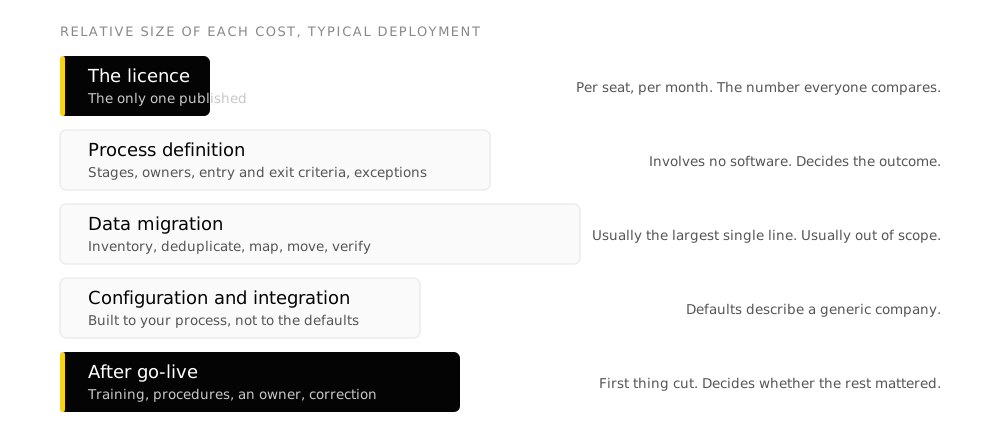
Per-seat pricing is the number that gets compared because it is the number that is published. It is rarely the number that decides whether the project was worth doing.
Process definition. What your stages are, who owns each one, what has to be true before a deal moves forward, what happens at the exceptions. Most organizations have never written this down, and the CRM will not write it for you. Configure a tool against an undefined process and you get an expensive record of a process nobody agrees on.
Data migration. Existing records inventoried, deduplicated, mapped to the new fields and moved. This is usually the largest single line of work and the most commonly left out of scope. It is also the reason a technically correct system gets abandoned, because people will not use a system whose data they know is wrong.
Configuration. Fields, layouts, permissions, automation and reports built to your process rather than left at the vendor’s defaults. Defaults describe a generic company.
Integration. Accounting, email, calendar, website forms, whatever else holds customer data. Every gap you do not close is a person exporting a file on a schedule that depends on them remembering.
The period after go-live. Role-based training, a written procedure per process, an administrator who knows the system, and a measured stretch where usage gets checked and the design gets corrected. This is the first thing cut when a budget tightens and the thing that decides whether the rest mattered.
A working rule
If the licence is the largest line in your CRM budget, the budget is incomplete. It is not that the licence is expensive. It is that the four items above are missing. What actually happens in a CRM implementation walks through each of them in order.
How to actually choose
-
Write down the process first
Stages, owners, entry and exit criteria, exceptions. If two people describe your sales process differently, settle that before you look at a single demo. This is the step that determines the outcome and it involves no software.
-
Decide what the system of record is for
Sales only, or sales plus service plus marketing on one record. This single answer removes about half the options before you compare anything.
-
Count the seats honestly
Including the people who will only ever read reports. Per-seat pricing punishes an undercount at renewal, and renewal is when your negotiating position is weakest.
-
Establish the currency and the required fees
Ask directly whether you will be invoiced in Canadian dollars, and what one-time fees are mandatory. Get both in writing before the demo flatters you.
-
Run a trial with your own data
Not the vendor's sample set. Load a hundred real records and run a real week through it. Most of these tools look identical in a demo and diverge immediately on real data. The trial and pricing links are in the fit list above.
-
Scope the migration before you sign
Whoever is doing the work, agree the record count, the field mapping and the deduplication rule up front. This is where timelines slip, and it slips after the contract is signed.
Mistakes that show up repeatedly
- Choosing on a feature comparison, when no two of the tools differ on a feature that will decide the outcome
- Buying the tier above what the process needs, on the theory that you will grow into it, and paying for it for three years first
- Treating data migration as an IT task rather than a decision about which records are true
- Approving a budget in Canadian dollars for a system invoiced in US dollars
- Going live without one named person who owns the system afterwards
- Letting the pipeline stages be whatever the vendor shipped by default
Frequently asked questions
What is the cheapest CRM that is actually usable?
Zoho CRM's free edition covers three users with leads, deals, workflows and reporting, and it is a real product rather than a trial. Beyond three users, Zoho Standard at C$19 and Pipedrive Lite at CA$19 are the lowest paid entry points quoted in Canadian dollars.
Which CRM tools bill in Canadian dollars?
Of the vendors checked in August 2026, Zoho CRM, Pipedrive and monday CRM display Canadian dollar pricing to a Canadian visitor. HubSpot, Salesforce and Capsule display US dollars. Confirm at the point of quotation, since this can change and larger agreements are negotiated separately.
Is there a required setup fee for a CRM?
It depends on the vendor and it is rarely prominent. HubSpot requires a one-time onboarding fee on Sales Hub Professional and Enterprise, stated on their pricing page as $1,500 and $3,500 USD. Most of the others do not charge a vendor fee, which does not mean setup is free. It means the work moves to you or to an implementation partner.
How long does a CRM implementation take?
For a small team on a defined process with clean data, a matter of weeks. Our own fixed-scope Zoho package runs five weeks including migration and training. What extends it is almost never the software. It is undefined process and unreconciled data, both of which tend to be discovered rather than planned.
Can we migrate from one CRM to another later?
Yes, and it costs roughly what the original migration cost, because it is the same work. The switching cost that matters is not the export. It is re-deciding the process, retraining people, and rebuilding integrations and reports.
Do we need a CRM if we already use spreadsheets?
The question is whether more than one person needs the same customer information, and whether anyone has to reconcile versions before trusting a number. A spreadsheet one person maintains is a legitimate answer. A spreadsheet four people edit is a reporting problem waiting to be found.
Are these prices current?
They were read from each vendor's own pricing page on 8 August 2026 from a Canadian connection. CRM pricing changes often and promotional rates are common. Treat everything here as a starting point for a quote rather than as a quote.
Takeaways
- Establish the invoicing currency before the feature comparison. It is the largest cost variable in this category for a Canadian buyer and it is the one nobody publishes.
- Ask every shortlisted vendor what one-time fees are required. At least one of the major options has a mandatory four-figure fee that its own comparison tables omit.
- The licence is the smallest part of what a CRM costs. If it is the largest line in your budget, the budget is missing the work that determines whether anyone uses the thing.
- Write the process down before you shortlist. Every tool here will faithfully reproduce a process you have not agreed on.
Sources
All pricing read 8 August 2026 from a Canadian connection, from each vendor’s own pricing page.
- Zoho CRM pricing,
zoho.com/crm/zohocrm-pricing.html - Pipedrive pricing,
pipedrive.com/en/pricing - monday CRM pricing,
monday.com/crm/pricing - HubSpot Sales Hub pricing,
hubspot.com/pricing/sales - Salesforce Canada sales pricing,
salesforce.com/ca/sales/pricing/ - Capsule CRM pricing,
capsulecrm.com/pricing/ - OnePageCRM pricing,
onepagecrm.com/pricing/
Vendor links in this article include affiliate and partner links. They do not affect the prices above, which come from the vendors’ published pages, or the assessment, which is ours.
Keep reading
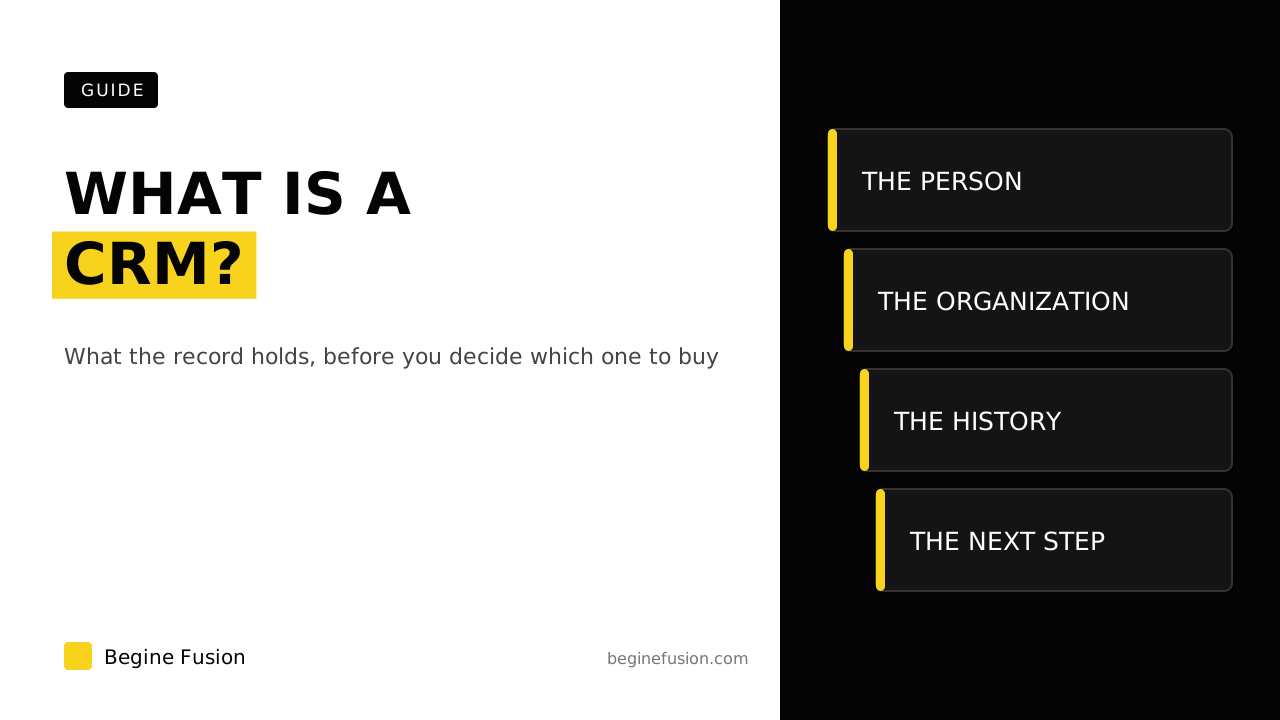 CRMWhat Is a CRM? Customer Relationship Management Software ExplainedA CRM is the system of record for everyone your organization sells to and serves. What that covers, what it is not, and how to tell whether you need one.
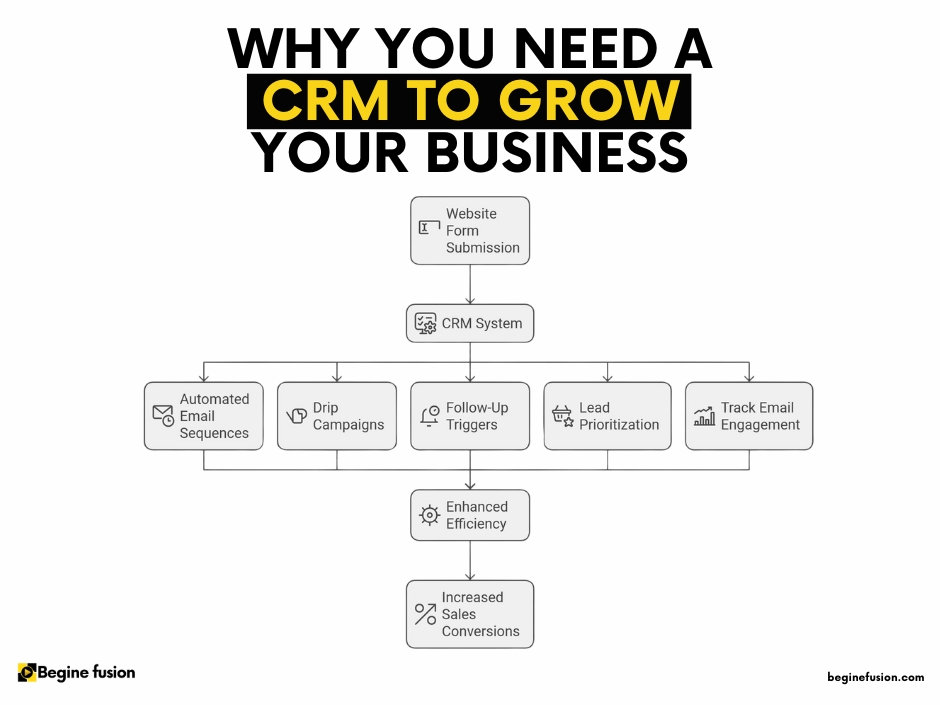 CRMSix Signs Your Organization Has Outgrown Its SpreadsheetThe specific symptoms that mean customer information has outgrown a spreadsheet, and what each one is actually costing before anyone notices.
 CRMWhy CRM Implementations FailCRM implementations fail when the project starts at the software. The five causes that show up after go-live, and the sequence that prevents them.
More resources
- ToolboxAI Tech ToolboxA curated set of tools for the work, with what each one does.
 Minimum Sales System Checklist: Before You Buy AIBefore you buy AI, check that your sales system has the basics. The form, the CRM, the alert and the follow-up, plus two questions I ask about pricing and where your last customer came from. Free download, made to print.