
How Law Firms Use AI: From First Enquiry to Matter Close
A law firm runs on one object. The matter. Everything in the practice either feeds it or falls out of it: the enquiry that becomes it, the conflict check that permits it, the documents that sit on it, the dates it is governed by, the time recorded against it and the invoice raised from it.
This guide walks that operation in the order it runs, names the work a system can take at each step, and names the decision that stays with a lawyer. It also names the one step the published law firm CRM templates leave out, which is the step that decides whether you have built a control or a conveyor belt.
TL;DR
- The money is on either side of drafting. Utilization, realization, collection and lockup move when intake, file assembly, deadlines and time capture change. Drafting speed moves none of them.
- The conflict check is a gate, not a search. The matter must be unable to open until the check is complete and recorded.
- Every published legal CRM template we reviewed runs enquiry straight into matter. None of them can refuse. That step is what an implementer adds.
- AI prepares, a person reviews, the system executes. Reading, searching, extracting and assembling are safe to hand over because none of them is judgment.
- Start with the record, not the AI. A drafting tool working from a half-empty matter file produces a draft that is half wrong.
Where the Money Actually Sits
The AI conversation in legal starts at document drafting, which is the one part a lawyer can already judge for themselves inside ten minutes. The money sits on either side of it.
Clio’s 2025 Legal Trends Report puts the average utilization rate at 38 percent, or three billable hours captured in an eight hour day. The same report puts realization at 88 percent and collection at 93 percent, which Clio states as 2.6 of those hours invoiced and 2.4 collected, against a median total lockup of 93 days.
Those four numbers move when intake stops depending on who picked up the phone, when the file assembles itself, when a date lives in a system rather than a diary, and when time is captured as it happens. Drafting speed moves none of them.
1. Intake: The Enquiry That Was Never Written Down
Enquiries reach a firm through the phone, a referral, the website form and a partner’s personal inbox. What gets recorded, and whether anything gets recorded, follows whoever took the call. The firm ends up unable to answer the two questions that decide how it grows: where the last twenty matters came from, and which enquiries went cold because nobody chased them.
Structured intake makes the prospective client a real record before anyone decides whether to act on it:
- Source and referrer, named
- Practice area and matter type
- Prospective client and related parties
- Opposing parties, where they are known
- Consultation scheduled, held, outcome
- Qualification notes and engagement status
The system reads the enquiry and its attachments, pulls the named parties and the dates, classifies the matter type and files the record. A lawyer decides whether the firm wants the work.
One structural point decides whether this survives contact with the firm. A prospective client is a different object from a client, and a matter is a different object from a sales opportunity. Legal intake dropped into a CRM configured for a sales team with a quota produces stages nobody recognizes and fields nobody fills, and the fee earners are back on their own notes inside a quarter. Configure the record around referral relationships, enquiry sources and matter types, and it gets used.
2. The Refusal Step
The expensive failure in a law firm is a search that returned nothing when it should have returned something.
The conflict check is repeated, rule driven, spread across four systems and catastrophic when it is missed. It runs against the practice management system, the closed files, the accounting ledger and somebody’s memory of a matter from 2019. Four of those five places are searchable.
The sequence is fixed:
Prospective client → related parties → opposing parties → existing clients and matters → search → human review → cleared or declined
What makes this a control is the refusal. The matter cannot open until the check is complete and recorded. A workflow that can only move forward is a conveyor belt, and a conveyor belt with a checklist taped to it is still a conveyor belt.
This is worth naming, because it is the step that gets left out. Look at what the published law firm CRM templates actually do.
Zoho’s own law firm case management use case describes web forms capturing enquiries from the firm’s website, a New Cases module, records assigned by default and tagged “New case”, custom views that let an attorney reassign a case to themselves, that reassignment converting the record and moving it into the Clients module, and a workflow rule that strips the tag and emails a partner if nobody picks the case up after three days. Zoho Creator’s legal case and matter management application covers end-to-end caseflow, client information, documents organized by case, client, court or type of dispute, task life cycles, notifications on litigation events, classification of parties as clients, opposing clients and witnesses, lawyer billing hours and invoice creation, and dashboards. A Zoho partner’s packaged law firm CRM structures the whole journey as lead management, matter management, contract generation, time and billing, and performance tracking, with contracts generated from flat fee, hourly and contingency templates and sent through Zoho Sign.
Those are capable starting points and they show the shape of what the platform does. Read the path each one takes from enquiry to open matter and the same thing is missing from all three: a step that can stop it. Creator does mention conflicts, and the conflicts it means are hearing dates coinciding, which is a scheduling problem rather than a conflict of interest.
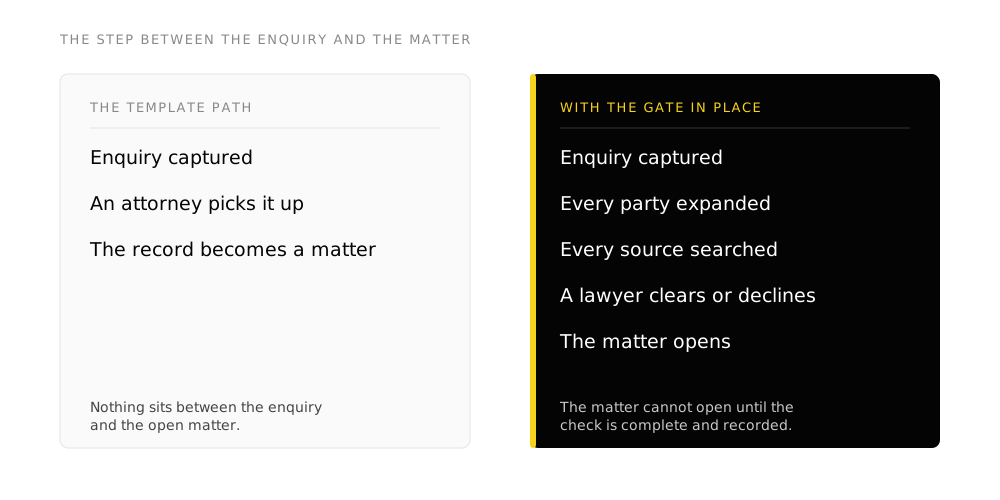
In practice the system expands the party list to include former names, trading names, subsidiaries and directors, searches every source at once including closed files, and ranks what came back with the reason it matched. A lawyer reads the results and clears or declines.
The record afterwards is the part that matters when somebody asks: what was searched, what came back, who reviewed it, what they decided and when.
Key takeaway
- A workflow that can only move forward is a pipeline. A workflow that can refuse is a control.
- Buy the template for the path. Build the refusal step yourself, because it is the one the firm is accountable for.
- The output of a conflict check is a record, not an answer. If you cannot show what was searched, you cannot show the check happened.
3. The Matter: One Record Everything Else Hangs Off
Once the matter opens it becomes the operating centre of the firm. Every field below hangs off it, and the value comes from all of them living in one place rather than across a folder, an inbox and a diary:
Matter number, client, responsible lawyer, supporting fee earners, practice area, matter type, opposing party and counsel, court and jurisdiction, key dates, status, tasks, time entries, documents, correspondence, notes, expenses, billing arrangement, retainer position, deadlines and related contacts.
The test of whether you have this is simple. Somebody covering for a colleague opens the matter and runs the next step without asking anyone a question. Twenty minutes of assembling before every client call means the record is spread out.
4. Documents: Generation, Storage and Signature
Matter creation should trigger the document side rather than being followed by it:
Matter opened → workspace created → engagement letter generated from the matter record → sent for signature → executed copy filed against the matter → status updated
The client’s name, address, matter reference and fee arrangement get typed once, at intake, and never again. The same route handles retainer agreements, NDAs, client letters, standard court forms and closing documents.
The system classifies incoming documents onto the right matter, extracts dates and obligations from them with the clause cited, and drafts the first version of standard correspondence. A lawyer settles anything that reaches a client, a court or the other side.
5. Practice Area Workflows
This is where a legal system stops resembling a generic CRM. Litigation runs a sequence:
Matter opened → conflict cleared → retainer signed → initial documents collected → pleadings prepared → filed → served → discovery → mediation → trial preparation → judgment or settlement → closing → archival
Immigration runs a different one. So do real estate, corporate and family. Each has its own required documents, its own gates and its own dates.
Building those sequences turns the matter record into a workflow engine for the practice. The value shows the first time a matter cannot skip a step, because the step that gets skipped under pressure is the one that produces the complaint.
6. Calendar and Deadlines
Matter events should create the dates rather than reminding somebody to create them: court dates, filing deadlines, discovery deadlines, limitation reminders, client meetings, document deadlines, internal review dates.
Two things make this a control rather than a diary.
The first is escalation. An approaching deadline goes to the assigned lawyer, then the assistant, then the supervising partner. A date sitting in one person’s diary is a single point of failure with a professional indemnity claim attached to it.
The second is the stop. Where a required step has not been completed, the workflow holds rather than continuing quietly.
The system reads incoming documents for dates and surfaces them against the rule that governs them, with the source cited. A lawyer confirms the date. A limitation date calculated by a system and applied without review is the one place in this entire architecture where nobody should accept automation.
7. Time Capture and Billing
Time reconstructed on a Friday afternoon loses the short tasks first, and the short tasks are most of the day. That is what a 38 percent utilization rate looks like from the inside.
Automatic time capture inverts the work. The system proposes entries from calendar activity, document work, email and calls, and the fee earner reviews and approves rather than recreating the week from memory. Billing narratives get drafted from the underlying activity, which removes the second reason entries go unrecorded.
Downstream, the matter feeds the invoice, and the four numbers the firm cares about become visible by matter type and by fee earner while there is still time to act on them: what was worked, what was billed, what was written off and how long the money took to arrive.
One caution on client trust accounting
General accounting software can be configured to handle retainers and client funds through liability accounts, and there are working implementations that do exactly that. Whether a given configuration satisfies your obligations is decided by your law society or bar, not by the software vendor and not by your implementer. Validate it against your jurisdiction's rules with somebody who is accountable for the answer before you move client money through it.
8. Where AI Actually Sits
AI is a layer across the architecture above rather than a product beside it. The pattern holds everywhere it appears:
AI prepares → a human reviews → the system executes
What the AI layer prepares, in a firm where the record already exists:
- Summaries of client correspondence
- Dates and obligations extracted from documents, with the source cited
- A matter timeline assembled from the file
- Incoming documents classified onto the right matter
- First drafts of standard correspondence
- Missing client information identified against a requirement list
- A matter briefing before a lawyer meeting
- Answers drawn from the firm’s own approved knowledge
- Billing narratives built from recorded activity
- Overdue tasks and approaching deadlines flagged
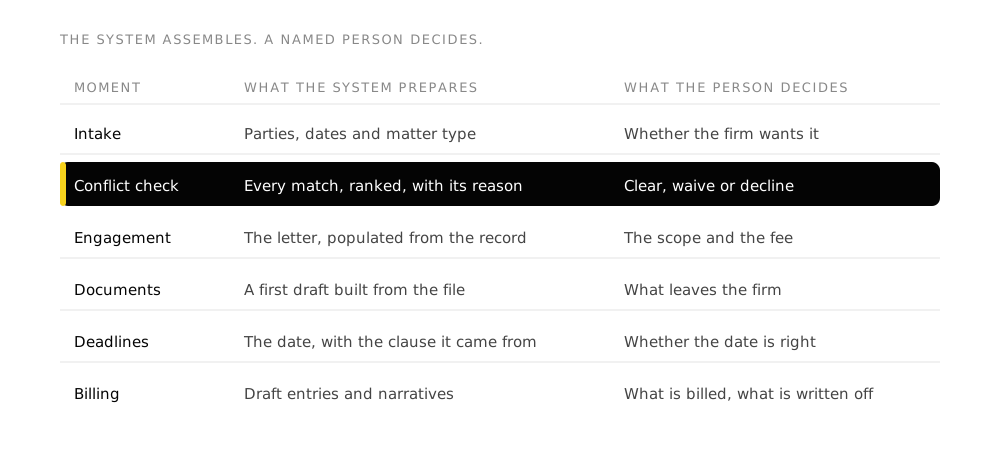
Every item on that list is reading, searching, extracting and assembling. None of it is judgment, which is what makes it safe to hand over. Whether to take a matter, whether a conflict can be waived, what a document means and what to tell a client are legal judgments, and they reach a named lawyer with the work already assembled and the reason attached.
A firm that inverts this, letting the AI decide and the human spot check, has built the one version of this that a regulator will take an interest in.
9. Governance: Decided Before Anything Is Built
ABA Formal Opinion 512, published in July 2024, is the clearest statement of the position: a lawyer using a generative tool still owes competence, confidentiality and supervision, and managing lawyers have to put a policy in place for the firm. Your own bar, law society or regulator may require more than that.
Six decisions get taken with whoever owns risk in the firm before a build starts, because between them they decide what the workflow is allowed to be:
- Confidentiality boundary. Which matters a workflow can see, which fields stay masked, what never leaves your systems.
- Client disclosure. Whether your retainer, your engagement terms or a specific client’s instructions require you to say a tool is used, and on what work.
- Lawyer supervision. Which outputs a named lawyer reviews before they go anywhere, and what that lawyer is expected to check.
- Deployment route. A governed pilot, a private tenant, or a dedicated environment. The workflow is identical in all three, so this is a decision about isolation and cost.
- Audit trail. What was searched, what came back, what was drafted, who approved it and what was refused, logged from the first pilot.
- Escalation path. What happens when an output is uncertain or a document says something the rules did not anticipate. A workflow with no escalation path escalates to whoever notices.
Somebody is already using AI on firm work in most practices, because it works and nobody said not to. The obligations land on the firm either way, which makes a written position cheaper than a ban and considerably cheaper than finding out.
Key takeaway
- Confidentiality is a design input, taken before the build, rather than a review at the end of it.
- Supervision is a condition of the workflow existing, not a setting inside it.
- An unwritten AI policy is still a policy. It is the one where every fee earner wrote their own.
10. Assembling It
The architecture above holds whatever you build it on. What it needs is one matter record, a conflict gate that can refuse, a document route that starts from the matter, dates that escalate, and an audit trail underneath all of it.
We build most of ours on Zoho One, where the pieces line up against the sections above: the CRM holds intake, referrers and relationships; a custom application holds matters and practice area workflows; WorkDrive holds the matter documents; Writer generates them; Sign executes them; Bookings handles consultations; Books handles invoicing; Analytics reports across the firm; and Flow connects the parts that need connecting.
The components matter less than the questions underneath them. Does one matter record exist. Can the conflict check refuse. Does a date escalate on its own. Can you show what happened afterwards.
Our position, stated plainly
Begine Fusion is a Zoho Authorized Partner, so Zoho is the stack we know deepest and the one we implement most often. The Zoho pages described in section 2 are cited because they are the clearest published statement of what a legal CRM template does, and the observation about the missing refusal step applies equally to the other packaged legal CRMs we have looked at. Read the disclosure and judge the argument on the architecture rather than on who is making it.
Where to Start
The right first build depends on which of these is your firm.
Enquiries arrive through four doors and nothing records where they came from. Start with intake and the client record. It is usually the cheapest of these builds and the one with the fewest people to convince, because nothing in it touches a matter, a limitation date or a conflict. It can go in while the firm is still deciding what it wants to do about the rest.
The conflict check runs on four systems and one person’s memory. Start with the conflict workflow and the refusal that goes with it. This is the build with a professional obligation attached, which is what makes it the one most firms name first.
The file lives in a folder, an inbox and somebody’s head. Start with the matter workspace and document generation. The gain shows immediately, in the assembling time before every client call.
Limitation dates sit in individual diaries. Start with the calendar, the escalation path and the stop. This is a small build with a large downside removed.
Time is written up on Friday from memory. Start with automatic time capture. It is the one on this list that pays for itself in revenue you already earned.
The principle across all five: start with the work that repeats most often and requires the least judgment, and leave the judgment where the rules already put it.
Common Mistakes
- Renaming the stages in a sales CRM and calling it a legal CRM. It fails because a matter behaves nothing like an opportunity: it has parties on both sides, dates that bind, and a close that is a court outcome rather than a signature. Build the matter as its own object and let the CRM hold the enquiry and the referrer.
- Treating the conflict check as a search box. A search a busy person can skip protects nobody, and it produces no record afterwards. Make the check a gate the matter cannot open without, and log what was searched alongside what came back.
- Starting with document drafting because it demos well. Drafting is the most visible AI capability and the least connected to utilization, realization and lockup. Start where the repeated work is, which is intake, assembly and time capture.
- Leaving a limitation date in one person's calendar. The date was probably calculated correctly, and it now depends on that person being at work. Put dates on the matter with an escalation path through the assistant to the supervising partner.
- Rolling out an AI tool before writing the confidentiality boundary. The policy then gets written to describe what the firm already does, which is the opposite of a control. Decide what a workflow may see, mask and export before it is built.
- Judging the pilot on how much people like it. Enthusiasm and login counts say nothing about accepted output. Take a baseline on the specific work before the build, measure the same work afterwards, and count the supervision burden openly.
- Buying a practice management replacement to solve an intake problem. Replacing the system of record is a large project with its own business case, and it does nothing about enquiries sitting in a partner's inbox. Map the operation first and find out which problem you actually have.
Frequently Asked Questions
What is the difference between a legal CRM and practice management software?
The CRM holds everything before the client says yes: the enquiry, the referrer, the consultation and what happened next. Practice management holds the matter, the work and the file. They connect rather than compete, and firms that try to run intake inside practice management usually end up with no record of the enquiries they lost.
Can Zoho CRM be used for a law firm?
Yes, and Zoho publishes a law firm use case that shows the shape of it: web forms feeding a cases module, assignment rules, custom views for attorneys and workflow rules that escalate an unclaimed case. What a template gives you is the path. What a firm has to add is the conflict gate, the practice area workflows and the supervision rules, because those are the parts a regulator will ask a named person about.
Does any of this give legal advice?
No. Everything described here is operational: reading a submission, searching your own records, extracting a date and citing the clause it came from, assembling a file, drafting a first version of a standard document. What a document means, whether a conflict can be waived, whether to take a matter and what to tell a client are legal judgments, and they stay with a named lawyer.
Is client information safe in an AI workflow?
That is decided by how the workflow is built rather than by the technology. Where the data sits, which systems it moves through, which matters and fields the workflow can see, who can read the log and how long anything is kept are decisions the firm takes before the build. ABA Formal Opinion 512 puts confidentiality and supervision on the lawyer rather than on the tool, so those decisions have to be written down and shown.
What should a law firm automate first?
The work that repeats most often and requires the least judgment. For most firms that is intake and the client record, because it is the cheapest build, it touches no matter and no limitation date, and it answers the question a growing firm most needs answered: where the work comes from.
How long does it take to implement a legal CRM?
Roughly eight to twelve weeks from the first session to one workflow running against a baseline you set, with two to three weeks of mapping in front of it to decide which workflow is worth building first. A firm that skips the mapping usually builds the workflow that was easiest to describe rather than the one that was costing the most.
Do we have to replace our practice management system?
Usually not. Connecting to what you already run through governed access puts the workflow inside your stack rather than beside it. Replacing a practice management system is a decision with its own business case, and if the mapping says that is your real problem it is better to hear it before spending money on a workflow that sits on top of it.
Glossary
- Matter
- The unit of work a firm bills against, from acceptance to close. It carries the client, the parties on the other side, the responsible lawyer, the dates, the documents and the money.
- Conflict check
- The search that establishes whether the firm can act, run across every party and every existing client, matter and closed file before a matter opens.
- Engagement letter
- The document that sets out scope, fees and terms and turns a prospective client into a client. It is the natural first candidate for generation from the matter record.
- Limitation date
- The deadline after which a claim can no longer be brought. Missing one is the failure most professional indemnity policies exist for.
- Utilization rate
- The share of a working day that is recorded as billable. Clio's 2025 Legal Trends Report puts the average at 38 percent.
- Realization rate
- The share of recorded billable work that actually gets invoiced. The gap is write-downs.
- Collection rate
- The share of invoiced work that gets paid. Realization and collection compound, which is how three billable hours captured become 2.4 hours collected.
- Lockup
- The number of days between doing the work and receiving the money, counting both unbilled work and unpaid invoices. Clio puts the median total at 93 days.
What This Does Not Do
It does not give legal advice, and a build partner who tells you otherwise is selling you a problem.
It does not build the client relationships that bring the firm its work, and it does not exercise the judgment that decides whether a strategy is sound or a conflict can be waived.
It does not rescue a thin record. A drafting tool working from a matter file that is half empty produces a draft that is half wrong, and the review time swallows the saving. The record comes first, which is why this guide starts at intake and not at the AI.
The firms that get value from this share one habit. They decided what the system was allowed to refuse before they turned it on, and they wrote the answer down.
Sources
Two outside sources carry the figures in this article, and both are named where they appear: Clio’s 2025 Legal Trends Report for utilization, realization, collection and lockup, and ABA Formal Opinion 512, published July 2024, for the supervision obligation. Nothing else here is presented as a statistic.
The template behaviour described in section 2 was read from three published pages: Zoho’s law firm case management use case, Zoho Creator’s legal case and matter management application page, and a Zoho partner’s packaged law firm CRM. Those pages describe what each product is documented to do. Any capability not stated on them is left out of this article rather than assumed.