
Zoho for Nonprofits in Canada: What the Program Actually Gives You
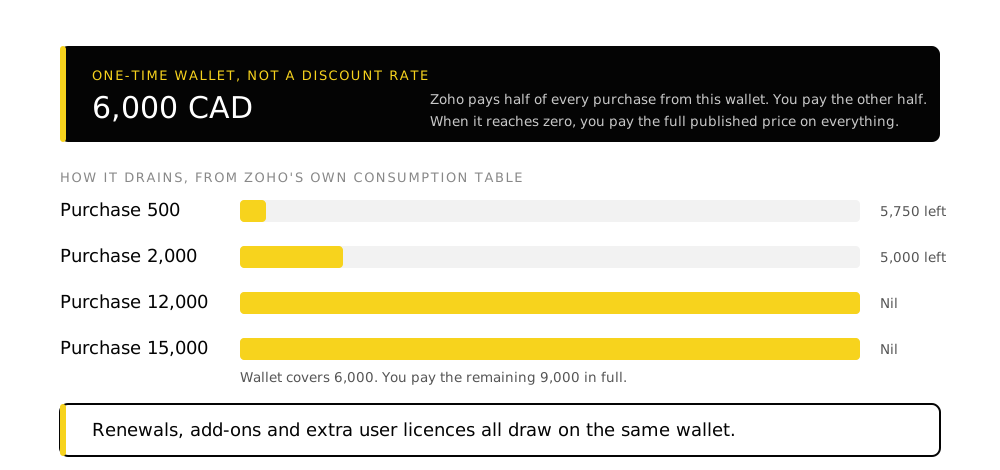
Zoho gives registered nonprofits a one-time credit of 6,000 CAD to spend across its products, applied as a 50/50 split against every purchase. It is a real and substantial offer, and it is not the thing most people assume it is.
TL;DR
- It is a one-time 6,000 CAD wallet, not an ongoing discount. Zoho pays half of each invoice out of the wallet until it is empty. After that you pay full price.
- It covers renewals, add-ons and extra user licences, all on the same 50/50 basis, which is what makes the wallet drain faster than people expect.
- Canadian charities can skip TechSoup. Canada is one of six countries permitted to apply directly with local documents instead of a TechSoup validation token.
- A specific list of products is excluded, including Zoho Voice, Zoho Backstage, Zoho Domains, ManageEngine, and any onboarding or training services Zoho sells.
- Credits are non-transferable, non-refundable and cannot be encashed. Delete the account and they are gone permanently.
- Sequence your purchases. The wallet is worth 6,000 CAD once. What you spend it on is a decision worth making deliberately rather than discovering.
Everything below was read from Zoho’s own nonprofit program pages on 8 August 2026 from a Canadian connection, which is why the figures are in Canadian dollars rather than converted from US pricing.
How the wallet actually works
The marketing line is that the program covers “up to 50% of your subscription costs.” That phrasing reads as a permanent half-price arrangement. It is not.
You receive a wallet holding 6,000 CAD. Every time you buy something, Zoho charges you half and takes the other half out of the wallet. When the wallet reaches zero, you pay the full published price on everything from then on.
Zoho’s own examples:
| Transaction value | You pay | Deducted from wallet | Wallet balance |
|---|---|---|---|
| 500 CAD | 250 CAD | 250 CAD | 5,750 CAD |
| 2,000 CAD | 1,000 CAD | 1,000 CAD | 5,000 CAD |
| 12,000 CAD | 6,000 CAD | 6,000 CAD | Nil |
| 15,000 CAD | 9,000 CAD | 6,000 CAD | Nil |
The last row is the one to read twice. On a 15,000 CAD purchase the wallet is exhausted at 6,000 and you pay the remaining 9,000 in full. The 50/50 split only holds while there is money in the wallet.
Why the wallet drains faster than expected
The split applies to subscription renewals as well as new purchases. A 500 CAD annual subscription takes 250 CAD out of the wallet in year one and another 250 CAD every renewal after that. Add-ons and additional user licences work the same way. An organization that grows its seat count is spending the wallet on the growth, not just on the original decision.
What the credits cannot be used for
This list is specific and worth checking before you plan around it. Zoho names the following as outside the program:
Zoho Voice, Zoho Start, Zoho Sign API credit plans, the pay-as-you-go edition of Zoho Campaigns, Zoho Domains, and Zoho Backstage.
ManageEngine, Qntrl, Vikra, TrainerCentral and Zoho POS are all outside the program entirely.
Onboarding, training and similar services sold by Zoho cannot be bought with credits. Neither can Marketplace extensions.
Regular support is available to every nonprofit on the program. Premium or enterprise support tiers cannot be purchased with credits.
The services exclusion matters more than it looks. The implementation work is the part that determines whether any of this gets used, and it is explicitly not covered. Budget for it separately rather than assuming the credits will stretch.
The rules that catch people
- Credits cannot be transferred between accounts once enabled, which is why Zoho asks for the Super Admin email address at registration. Register under the right account the first time.
- Credits cannot be split across multiple admin accounts.
- Credits are non-refundable. Cancel a subscription you bought by mistake and the consumed credits are not reinstated.
- Credits cannot be encashed under any circumstances.
- Delete the account and the credits are permanently lost, even if you recreate it with the same email address.
- If your organization has already received credits through another Zoho program, you cannot claim these as well.
How Canadian nonprofits apply
Zoho uses TechSoup as its vetting partner. TechSoup verifies that an organization is a genuine nonprofit and issues a validation token, which Zoho then trusts.
Canada is one of the exceptions to that route.
-
Decide which route you are using
Applicants from Canada, the United States, the United Kingdom, India, Australia and New Zealand may apply directly by supplying local registration documents, rather than obtaining a TechSoup validation token first. For a Canadian registered charity that usually means the documents you already have.
-
Create the Zoho account you actually want to own this
Credits attach to the account that applies and cannot be moved afterwards. Use an organizational address controlled by the organization, not a personal one and not a departing staff member's.
-
Submit the application with documents
Complete Zoho's nonprofit form and upload the registration credentials. Zoho validates the application and emails you when it is approved.
-
Plan the first purchase before you make it
This is the step with no deadline attached and the most consequence. The wallet is 6,000 CAD and it is spent in the order you buy things.
On TechSoup renewals
If you do use the TechSoup route, the validation token has to be current when you first apply. Zoho states that letting it expire later does not cost you access to subscriptions you already hold.
What to spend the wallet on
Zoho does not tell you this part, and it is where the value is either realised or wasted. The wallet is finite, so the question is which purchases benefit most from being half price.
The system of record first. Whatever holds your donors, members or beneficiaries is the thing everything else depends on. For most organizations that is Zoho CRM. Getting this wrong is expensive in a way that a wrongly chosen secondary app is not. The three routes to donor management in Zoho covers that choice and what each one leaves you to build.
Seats you will genuinely use. Extra licences consume the wallet on the same 50/50 basis. Buying seats for people who will not use the system spends the credit on nothing.
Longer commitments where you are confident. Because renewals draw on the wallet too, the credit stretches across years rather than being a one-off discount on year one. That makes the sequencing question a multi-year one.
Not the implementation. Services are excluded, so the work of defining the process, migrating donor data and training staff has to be budgeted from real money. That work is what decides whether the software gets used, which is the argument for budgeting it first and letting the credits cover licensing.
Where nonprofits actually get stuck
The program is a licensing discount. The problems that stop nonprofit technology projects are almost never licensing problems.
- Donor records live in a spreadsheet, the accounting system, an email platform and somebody's inbox, with no agreement on which is authoritative
- Receipting is manual, so it happens in a batch at year end under time pressure
- Grant and impact reporting requires somebody to reconcile several sources before the numbers can be submitted
- The person who knows how everything works is a volunteer or a single staff member, and there is no written procedure behind them
- A system was set up by a well-meaning supporter who has since moved on, and nobody can change it
Every one of those is a process and data problem rather than a software problem, which is why claiming the credits and buying the licences is the start of the work rather than the end of it. The sequence that holds is the same as anywhere else: define the process, establish the record, clean the data, then automate. The implementation guide covers what that involves stage by stage.
Frequently asked questions
How much is the Zoho nonprofit discount worth?
A one-time credit of 6,000 CAD for Canadian applicants, applied as a 50/50 split against purchases until the wallet is exhausted. It is a fixed pool rather than an ongoing discount rate, so the total value of the program is 6,000 CAD.
Is Zoho free for nonprofits?
No. Zoho covers half of each purchase from the credit wallet until the 6,000 CAD is used up, after which you pay the published price. Separately, Zoho CRM has a free edition for up to three users that anyone can use, nonprofit or not.
Do Canadian charities need TechSoup to apply?
No. Canada is one of six countries where applicants may apply directly with local registration documents instead of obtaining a TechSoup validation token. The TechSoup route remains available if you prefer it or already hold a token.
Can the credits be used for Zoho One?
Zoho One is not on the published exclusion list, so it can be purchased with credits. Because Zoho One is a per-user bundle, it consumes the wallet quickly at any meaningful headcount, which makes it the clearest case for planning the purchase before making it.
What happens when the credits run out?
You pay the full published price on everything from then on, including renewals of subscriptions you originally bought at the split rate. This is worth modelling before you commit, because the cost of year three is not the cost of year one.
Can we use the credits to pay for setup or training?
No. Onboarding, training and similar services sold by Zoho are explicitly excluded, as are Marketplace extensions and premium support tiers. Implementation has to be budgeted separately.
What if we already got credits from another Zoho program?
Then you cannot claim these as well. Zoho states the nonprofit credits are not available to organizations that have received credits through another Zoho program.
Takeaways
- The program is worth 6,000 CAD once. Read it as a fixed pool rather than as a permanent half-price rate, because renewals and extra seats draw on the same pool.
- Canadian charities can apply directly with local documents and do not need to go through TechSoup first.
- Register under an account the organization controls. Credits cannot be moved, split, refunded or recovered after an account is deleted.
- Implementation is excluded from the credits and is the part that determines whether any of it gets used. Budget it separately and first.
Sources
Read 8 August 2026 from a Canadian connection.
- Zoho for Nonprofits program page, credit consumption table and FAQ sections covering eligibility, billing, exclusions and TechSoup validation,
zoho.com/nonprofits/ - Zoho CRM pricing,
zoho.com/crm/zohocrm-pricing.html
Program terms change. Confirm current figures and the exclusion list with Zoho before committing a budget.