
Zoho Donor Management: The Three Routes, and What You Build Yourself
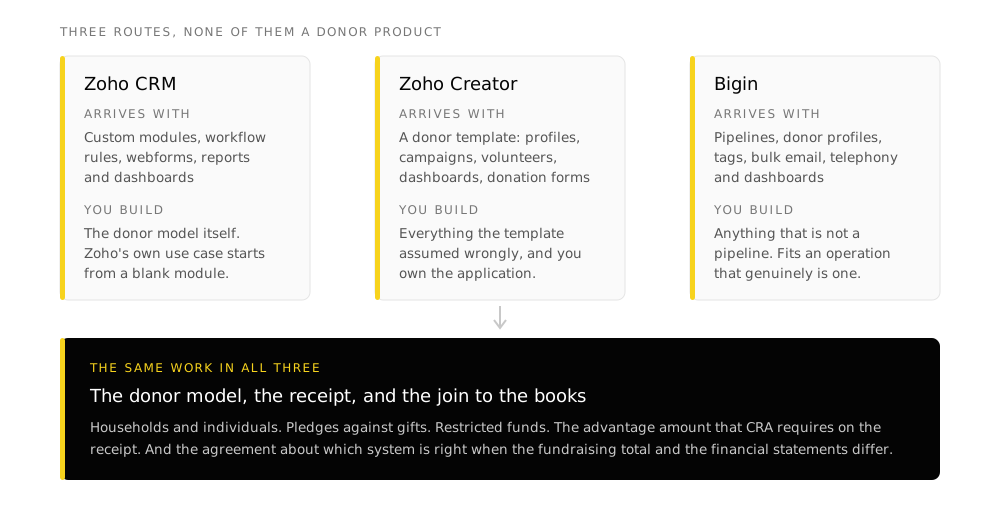
Search for Zoho donor management and you land on product pages for four different Zoho products. Zoho CRM ships with no Donors module, no Donations module and no Gifts module. What Zoho sells is a set of platforms that can be configured into a donor system, and the configuration is the entire job.
TL;DR
- There are three routes: Zoho CRM with custom modules, the prebuilt donor management template on Zoho Creator, or Bigin if your whole operation fits in a pipeline.
- Zoho's own donor documentation builds custom modules. Its published CRM use case creates modules named Zero Donors, Current Donors and Funds. That is a configuration recipe, and it tells you the shape of the work.
- The CRA receipt decides your data model. An official donation receipt has a fixed list of required elements. If the gift record cannot produce every one of them, receipting stays manual regardless of which product you picked.
- Six modelling decisions come before configuration: donor versus household, gift versus pledge, recurring gifts, restricted funds, gifts in kind, and who gets credited for a gift they did not write the cheque for.
- The relationship and the money live in different places. Zoho positions CRM as the donor hub and Books as the finance system. The reconciliation between them is a decision, not a default.
- The implementation is excluded from the nonprofit credits. The 6,000 CAD wallet buys licences. It does not buy the configuration that makes them work.
Everything about Zoho below was read from Zoho’s own product and documentation pages on 8 August 2026. The receipting requirements come from the Canada Revenue Agency.
The three routes, and who each one is for
The route Zoho's nonprofit page points at, and the one most organizations end up on. You get custom modules, workflow rules, webforms, reports and dashboards, and everything else the platform does. You also get a blank page where the donor model should be.
Creator ships prebuilt nonprofit templates, including a donor management app that arrives with donor profiles, campaign tracking, volunteer coordination, dashboards and fundraising pages with donation forms. You start further along and you own more of what happens next.
Pipelines, donor profiles, tagging by donor type, bulk email with open tracking, built-in telephony and dashboards. It suits an organization whose fundraising genuinely is a pipeline of conversations. It has no donor module either.
A dedicated fundraising system with receipting, pledge schedules, soft credits and fund accounting built in. If that is what you are shopping for, price a purpose-built product against a Zoho configuration honestly rather than assuming the suite covers it.
What Zoho’s own donor configuration actually does
Zoho publishes a CRM use case for automating donor generation and retention. It is worth reading closely, because it shows what a Zoho donor build looks like from the inside.
The configuration creates three modules: Zero Donors for people likely to give who have not yet, Current Donors for people who have, and Funds for the donation records themselves. Around those it uses four platform features:
-
Webforms to capture prospective donors
A form on the website writes directly into Zero Donors, so somebody who fills it in exists as a record rather than as an email in an inbox.
-
Workflow rules for acknowledgement
Any new donor entering Current Donors receives an acknowledgement email automatically. This is the piece most organizations do by hand and then stop doing in December.
-
Date-triggered rules for the giving anniversary
A workflow rule fires from the Funds module on the anniversary of a donation to prompt a repeat gift. Date-based triggers are the mechanism behind most donor retention automation, and they depend entirely on the gift date being recorded correctly.
-
Reports and dashboards by service category
Top donors segmented by the category of work they support, which is only possible if gifts carry the category as a field rather than as a note.
The receipt is the requirement everything else has to satisfy
For a Canadian registered charity this is the part that decides the data model, and it is decided by the Canada Revenue Agency rather than by any software vendor.
An official donation receipt has to carry a specific list of elements. Every one of them has to come from somewhere, which means every one of them is a field on the donor record or the gift record.
What CRA requires on an official donation receipt for a cash gift
A statement that it is an official receipt for income tax purposes. The charity's name and address as recorded with CRA. The charity's registration number. The name and website address of the Canada Revenue Agency. The donor's name and address. The day the gift was received, or for cash gifts the year alone. The day the receipt was issued. The amount of the gift. A description of any advantage the donor received in return. The eligible amount of the gift. The signature of an individual authorized to sign receipts.
Read that list as a field specification and three things follow.
Advantage has to be a field, not a memory. If a donor received a ticket, a dinner or a benefit of any kind, the receipt must describe it and the eligible amount must be reduced by it. A system that stores only the amount paid cannot produce a correct receipt for any gift that came with something attached, which in practice means every gala and every auction.
The donor’s address has to be current at receipting time, not at gift time. This is a data hygiene requirement dressed up as a compliance one. It is also the reason a donor record with three conflicting addresses across a spreadsheet, an email platform and the accounting system is a receipting problem rather than a tidiness problem.
The authorized signature has to be governed. Somebody is authorized and somebody is not. That is a permissions question in whatever system issues the receipt.
- Do not plan to issue receipts out of the email platform. It holds a list, not a gift record.
- Do not let the receipt template live in a document on one person's machine.
- Do not treat gifts in kind as a variant of cash gifts. They carry their own requirements, including fair market value and how it was determined.
- Do not defer the receipting design to phase two. It is the constraint that shapes phase one.
Six things to decide before you configure anything
These are the decisions that separate a donor system that works from one that gets abandoned in year two. None of them is a Zoho question. All of them have to be answered before a Zoho question can be.
Two spouses give separately and attend together. Are they one supporter or two? The answer changes your mailing counts, your retention numbers and every receipt you issue.
A commitment to give is not a gift and cannot be receipted as one. If you run campaigns with pledges, you need both objects and a relationship between them.
A monthly donor is one relationship producing twelve gift records a year. Decide now whether the receipt is annual or per gift, and whether a failed payment is a lapse or a retry.
Money given for a named purpose has to be tracked to that purpose and reported on separately. This is where the CRM and the accounting system have to agree, and where they usually do not.
Non-cash gifts carry their own receipting rules and their own valuation question. Decide whether they live in the same module as cash gifts or a separate one.
A board member who brings in a corporate donation, a donor-advised fund, a memorial gift given in someone's name. The person who influenced the gift and the entity that gave it are different records, and both need the relationship.
Where the relationship ends and the money begins
Zoho positions CRM as the hub for donors and volunteers, and Books as the finance system, with income and expenses categorized by event, project or fund. Both statements are true and the gap between them is where implementations get stuck.
The clean division is that the CRM owns the relationship and the gift as an act of giving, and the accounting system owns the transaction as money. What has to be decided is the join: which system creates the record first, which one is authoritative when they disagree, and what reconciles them.
Getting this wrong produces the most common failure in nonprofit reporting, which is a fundraising total that does not match the financial statements and no agreed way to work out which one is right. That is two systems configured correctly and never introduced to one another.
The credits do not cover this
Zoho's nonprofit program gives Canadian registered nonprofits a one-time 6,000 CAD credit applied as a 50/50 split against purchases, and it explicitly excludes onboarding, training and services. The licences are subsidised. The work of defining the donor model, migrating the data and training staff is not. What the program actually gives you covers the exclusions in full.
Where donor projects actually fail
The software choice gets the attention. These are what the work usually turns out to be.
- Donor records exist in a spreadsheet, the accounting system, an email platform and somebody's inbox, with no agreement on which is authoritative
- The same donor exists three times because the import matched on name and the name was spelled two ways
- Historical gifts were migrated without their fund designation, so every restricted balance has to be rebuilt by hand
- Receipting was designed after go-live, and the gift record turns out not to hold the advantage amount
- The one person who understood the old spreadsheet has left, and the logic in it was never written down
- The system is technically live and staff continue to work in the spreadsheet, because the spreadsheet still does one thing the system was never configured to do
Every one of those is a data or process problem rather than a product problem, which is why the sequence that holds is the same here as anywhere else: define the process, establish the record, clean the data, then automate. The implementation guide covers what that involves stage by stage.
Frequently asked questions
Does Zoho have a donor management module?
No. Zoho CRM ships with no Donors, Donations or Gifts module. Donor management in Zoho is a configuration built from custom modules, or a prebuilt template on Zoho Creator. Zoho's own published donor use case creates modules called Zero Donors, Current Donors and Funds, which is a good indication of the shape of the work.
Should we use Zoho CRM or Zoho Creator for donors?
CRM if the donor relationship looks like a relationship you manage over time and you want the platform's reporting, automation and integration depth. Creator if you want to start from a working donor app and shape it, and you are comfortable owning an application rather than configuring a product. Organizations that need both usually end up with CRM as the system of record and Creator for the specific processes CRM does not model.
Can Zoho issue CRA-compliant donation receipts?
Zoho does not ship a Canadian charitable receipt out of the box. The elements CRA requires can all be produced from a correctly configured system, which is the point: the receipt template is straightforward once the gift record holds the advantage amount, the eligible amount, the fund designation and a current donor address. The design work is in the record rather than the template.
Is Zoho CRM free for nonprofits?
Zoho CRM has a free edition for up to three users that is available to anyone. Separately, registered nonprofits can apply for a one-time 6,000 CAD credit applied as a 50/50 split against purchases. Neither of those covers implementation, which Zoho's program excludes explicitly.
What about volunteers?
Zoho's nonprofit page assigns volunteer management to CRM alongside donors: online signup, profiles for matching people to opportunities, event roles and attendance, and impact reports. Zoho Creator's nonprofit templates cover volunteer engagement as well. The modelling question is whether a volunteer and a donor are the same record with different roles, which for most organizations they are, because a meaningful fraction of people are both.
How do we get gifts from the website into the system?
Zoho's documented pattern is a webform writing directly into the donor module, and Creator's donor template includes fundraising pages with donation forms. The payment side depends on which gateway you use and how it reports settlements, which is a question to answer before the build rather than during it, because it determines whether a gift arrives as one record or as a payment that somebody matches to a person afterwards.
We already have donor data in a spreadsheet. What happens to it?
It gets cleaned before it gets imported, and the cleaning is usually the largest single task in the project. Duplicates, inconsistent name formats, addresses that were never updated, gifts without a fund designation and pledge amounts recorded as gifts all have to be resolved while the old system is still there to check against. Importing first and cleaning afterwards means cleaning in a system nobody trusts yet.
Takeaways
- Zoho donor management is a configuration decision across three routes rather than a product you buy. Choose the route on how much you want to own, not on the feature list.
- Design the receipt first. Its required elements are a field specification for the gift record, and they are set by CRA rather than by the software.
- Answer the six modelling questions before anyone opens a Zoho admin panel. Households, pledges, recurring gifts, restricted funds, gifts in kind and indirect credit are the ones that are expensive to change later.
- Decide explicitly where the CRM stops and the accounting system starts, and what reconciles them. A fundraising total that disagrees with the financial statements is a design gap, not a bug.
- Budget the implementation separately. The nonprofit credits cover licences and exclude services.
Sources
Zoho pages read 8 August 2026 from a Canadian connection.
- Zoho for Nonprofits, product roles and the donor and volunteer management descriptions,
zoho.com/nonprofits/ - Zoho CRM use case, automating donor generation and retention activities, including the Zero Donors, Current Donors and Funds module structure,
help.zoho.com - Zoho Creator donor management app template and nonprofit solutions pages,
zoho.com/creator/ - Bigin for nonprofit organisations,
zoho.com/zohobigin/ - Canada Revenue Agency, what information must be on an official donation receipt from a registered charity,
canada.ca/charities-giving
CRA’s page is the authoritative statement of receipting requirements and it changes. Confirm the current list before you build a receipt template against it. Zoho’s product packaging changes too.