
Zoho One Business Operating Software: Three Prices and a Payroll Commitment
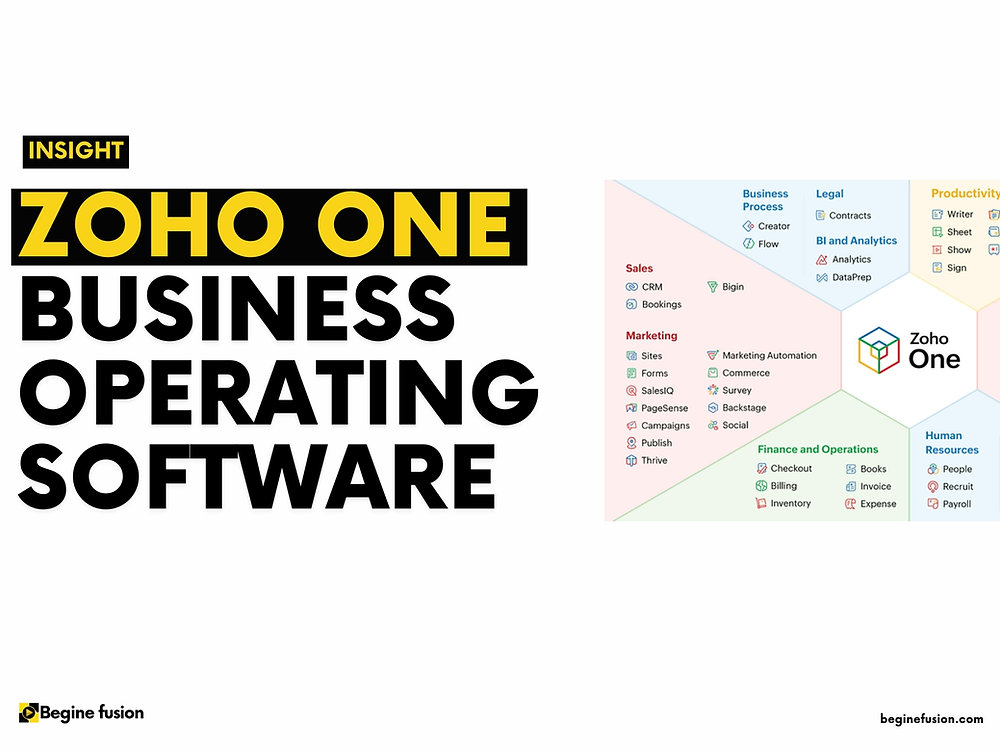
Zoho One is a licence, not a product. You are not buying an application. You are buying access to Zoho’s application catalogue under one subscription, one administrator and one invoice.
That distinction decides everything about whether it is a good purchase, and it is why the pricing model deserves more of your attention than the app list does.
TL;DR
- Three ways to buy it, and they are priced so differently that the choice between them matters more than the choice to buy at all.
- Essentials is US$9 per user per month billed annually, for 14 named applications. Bigin covers sales in that tier and Zoho CRM begins at Standard, which is the detail that decides whether Essentials works for you.
- All Employee pricing is US$37 per employee per month, and it means every employee on payroll, including the ones who will never sign in.
- Flexible User pricing is US$90 per user per month, licensing only the people who need it. It costs almost two and a half times as much per seat, and it is frequently the cheaper option.
- The break-even is roughly 41% of headcount. Below that, licence only the users you need. Above it, all-employee pricing wins.
- The apps are not the hard part. Getting fifty applications is easy. Deciding which four you will actually run, and configuring those properly, is the work.
What you actually get
Zoho One covers the functional areas most organizations buy separately: sales and CRM, marketing, customer support, finance, HR, project management, and collaboration. Zoho’s own description of the Standard edition is “50+ business applications designed to cover all areas of your company”, with the Essentials edition carrying “15+ unified business apps”.
Underneath the app count, three things are the actual product:
Central control of users and permissions. A person is added once and removed once, which is a genuine operational difference from a stack assembled tool by tool.
A single line for the whole suite instead of eleven renewal dates nobody owns. Small, and it removes an entire category of administration.
The apps share a data layer and are designed to pass records between each other, so the integration problem that dominates a mixed stack largely does not arise.
The Standard edition includes the customization tooling to build what the catalogue does not cover, which is what stops the suite becoming a constraint.
Every application, and which edition it is in
Zoho’s marketing figures are 50+ applications on Standard and 15+ on Essentials. The plan details pages name 48 and 14 respectively, with Zoho Directory listed underneath both as the identity layer rather than as an application.
Read the middle column first. Everything in the right-hand column needs Standard, at US$37 per employee or US$90 per user.
| Category | In Essentials, US$9 | Standard adds |
|---|---|---|
| Sales | Bigin, Sites | CRM, Bookings |
| Marketing | SalesIQ, Campaigns | Social, Survey, Forms, PageSense, Backstage, Marketing Automation, Thrive, LandingPage |
| Support | Desk | Assist, Lens |
| Productivity | Mail, Cliq, Projects, WorkDrive, Meeting, Notebook | Sprints, Connect, Learn, TeamInbox, Sign, Vault, Vani |
| Finance | Books | Invoice, Billing, Expense, Inventory, Checkout, Payroll, Commerce |
| HR | People, Recruit | None |
| Legal | None | Contracts |
| Business Process | None | Creator, Analytics, DataPrep, Flow, Robotic Process Automation |
| Security and IT Management | None | Log360 Cloud |
| Customer Experience | None | CommandCenter |
Category names and application names are Zoho’s own, read from the plan details pages on 11 August 2026.
Three things that table shows and a headline app count hides:
- Sales in Essentials means Bigin. Zoho CRM is a Standard application. Bigin runs pipelines for a small team and the two products are scoped for different businesses, so this is the most consequential line in the table.
- Finance in Essentials means Books. Invoicing, billing, expenses, inventory, payroll and Commerce all sit in Standard.
- Four categories are empty on Essentials. Legal, Business Process, Security and IT Management, and Customer Experience arrive with Standard, and that is where Creator, Analytics and Flow live. Those three are what you build with once the catalogue stops covering something.
Underneath the applications sits a layer Zoho lists separately from the catalogue: Zoho Directory for single sign-on, Active Directory sync, and central user and device management, alongside organization-wide security policies, document automation credits, and Zoho Publish for business listings. That layer is doing most of the work behind the one-identity claim above.
The pricing, verified
US dollars, read from Zoho’s own pricing page on 11 August 2026. Zoho prices Zoho One separately in more than twenty currencies, so check your own before you commit to a number. The method behind these figures is in the sources at the foot of this article.
| Plan | Billed annually | Billed monthly | Licensed |
|---|---|---|---|
| Essentials | US$9 /user/month | US$11 /user/month | Per user |
| Standard, All Employee | US$37 /employee/month | US$45 /employee/month | Every employee on payroll |
| Standard, Flexible User | US$90 /user/month | US$105 /user/month | Only the users you choose |
Zoho’s page states that local taxes are charged in addition to the prices shown. It also carries the condition attached to All Employee pricing in plain terms: “Your business will have to commit to purchase Zoho One licenses for ALL employees on payroll.”
Read the all-employee condition carefully
It means every employee, not every employee who needs the software. A twenty-person business where six people would ever sign in still buys twenty licences at US$37 to get that rate. Whether that is good value is arithmetic, and the arithmetic is below, but it is a commitment about your payroll, not about your software usage, and it should be checked against your actual headcount before it is compared to anything.
Zoho offers a 30-day trial of the full Standard catalogue with no card details, which is the cheapest way to test the right-hand column against your own work before you price anything.
Start a Zoho One trial (partner link)
Partner link. Begine Fusion is a Zoho partner and may earn from this sign-up. Your price is the same.
The break-even, worked out
Two Standard options, two different units. All Employee charges US$37 per employee. Flexible User charges US$90 per user. The question is what fraction of your people need access.
All-employee pricing becomes the cheaper option once more than about 41% of your headcount needs a licence, which is where US$37 across everyone equals US$90 across the users.

| Employees | Users needing access | All Employee | Flexible User | Cheaper |
|---|---|---|---|---|
| 20 | 5 | US$740 | US$450 | Flexible |
| 20 | 8 | US$740 | US$720 | Flexible |
| 20 | 10 | US$740 | US$900 | All Employee |
| 50 | 15 | US$1,850 | US$1,350 | Flexible |
| 50 | 25 | US$1,850 | US$2,250 | All Employee |
| 100 | 40 | US$3,700 | US$3,600 | Flexible |
| 100 | 60 | US$3,700 | US$5,400 | All Employee |
Monthly figures at the annual rate, before tax. The second row is worth a second look: at twenty employees the two models are twenty dollars apart, which is close enough that the commitment matters more than the money.
The pattern is worth naming. A business where software is used by a sales and admin core while most of the headcount is in the field, on a shop floor or in a kitchen sits well below the line and should not take all-employee pricing. A professional services firm where nearly everyone is at a desk sits well above it, and all-employee pricing is materially cheaper.
Where Essentials changes the picture
The Essentials edition is the tier most often missed, and at US$9 per user per month the arithmetic is worth working through.
Compare it against Bigin, because Bigin is the sales application Essentials actually ships. Bigin Express is US$7 per user per month billed yearly and Bigin Premier is US$12. Essentials sits between the two at US$9 and carries thirteen further applications with it, including Books, Mail, WorkDrive, Projects, Desk, People and Campaigns.
For a small team whose work sits inside that catalogue, the suite costs roughly what the sales tool alone would. The constraint is the catalogue rather than the price.
A team that specifically needs Zoho CRM is in a different comparison: US$14 per user for CRM Standard on its own, against US$90 per user or US$37 per employee for the Zoho One edition that contains it. Essentials sits outside that question entirely.
Check the edition each application runs at as well as its presence in the table. Zoho publishes feature limits per application per plan, so a tier can include an application while holding back the specific capability you were counting on.
When Zoho One is the right buy

- You would otherwise buy three or more Zoho products separately. The arithmetic usually favours the suite quickly.
- You are consolidating a sprawling stack. The integration-already-solved property is worth real money if your current problem is systems that do not talk.
- Most of your headcount works at a desk. Which puts you above the all-employee break-even.
- You want one administrator and one offboarding process. This is undersold and it matters more as headcount grows.
- You expect to need applications you have not identified yet. The catalogue removes a procurement cycle each time.
When it is not
- You need one product well. Buy that product. A single Zoho application is considerably cheaper than the suite
- Most of your staff will never sign in, and you were about to take all-employee pricing because the number looked smaller
- Your business depends on a specialist tool the suite does not replace, so you are paying for the suite and keeping the specialist anyway
- Nobody will own the configuration. Fifty unconfigured applications is a worse position than three configured ones
- You are buying it to solve an adoption problem. A wider catalogue does not make an unused system used
The failure mode we see most
An organization buys Zoho One, turns on eleven applications in the first month because they are included, and configures none of them properly. Six months later CRM is half-used, three apps are abandoned, and the suite has a reputation problem inside the business that the software did not earn. Turn on what you are ready to configure. The rest of the catalogue is not going anywhere.
How to approach it
-
Count two numbers
Employees on payroll, and people who would genuinely sign in. The ratio between them decides which pricing model you are even comparing.
-
Price the alternative honestly
What the individual Zoho products you actually need would cost, plus whatever specialist tools you would keep either way. That is the real comparison, not suite-against-whole-stack.
-
Check Essentials against your must-haves
If everything you need is in the 15+ catalogue, the price difference against Standard is large enough to be worth an hour of checking.
-
Pick the first application, singular
Usually CRM, because it is where the revenue process lives. Configure it properly and get it used before turning on the second.
-
Add applications against named problems
Each new app answers a specific thing somebody is currently doing badly. Anything turned on because it is included will be abandoned.
Frequently asked questions
How much does Zoho One cost?
Three prices in US dollars, all billed per month: Essentials at US$9 per user, Standard All Employee at US$37 per employee, and Standard Flexible User at US$90 per user, each at the annual billing rate. Monthly billing costs more: US$11, US$45 and US$105 respectively. Local taxes are charged on top. Zoho publishes a different price list for each of more than twenty currencies, and the ratios between the three plans move with it, so read your own currency before you build a budget. These figures were read on 11 August 2026 and Zoho changes them without notice.
What does "all employee pricing" actually require?
A commitment to buy a Zoho One licence for every employee on your payroll, in Zoho's own words, not for every employee who uses the software. That is what buys the lower per-seat rate. It is a straightforward trade and it is only good value above roughly 41% licence-to-headcount, which is the point where the two Standard models cost the same at Zoho's US dollar rates.
Is Zoho One better value than buying Zoho CRM alone?
Only if you will use more than the CRM. Zoho CRM Standard is US$14 per user per month against Zoho One Standard Flexible User at US$90, so a business that needs a CRM and nothing else is paying six times over for a catalogue it will not open. Essentials at US$9 looks like the way around that, and it ships Bigin instead of Zoho CRM, so it answers a different question. Price Essentials against Bigin Express at US$7 and Bigin Premier at US$12. Price Zoho CRM against Standard.
Does Zoho One Essentials include Zoho CRM?
Essentials ships Bigin as its sales application, and Zoho CRM begins at the Standard edition. That is the main dividing line between the two tiers, and it is the assumption most people carry into Essentials without checking. Bigin is a pipeline tool built for small teams, so a business that has already outgrown a simple pipeline is looking at Standard whatever the headline price difference suggests.
How many applications are in Zoho One?
Zoho states 50+ business applications in the Standard edition and 15+ in Essentials. Its plan details pages name 48 and 14 by title, across ten categories, and the full list is in the table above. The count is the least useful thing about it. A more productive question is which four applications you will run in the first year, because that is what determines whether the suite returns anything.
Can we move from Essentials to Standard later?
Zoho's pricing FAQ addresses upgrades and downgrades between the two editions directly, so confirm the current terms there rather than on a summary like this one. The practical planning point is to check which of your must-have features sit in Standard only, because that is what will eventually force the move and it is better to know the trigger in advance.
Does Zoho One replace Microsoft 365 or Google Workspace?
It covers the same functional ground: mail, documents, storage, collaboration. It goes considerably further into business applications that neither of those attempts. Whether it replaces them in practice is usually a question about documents and habit rather than capability. For what the three productivity suites cost and what each one charges for, see the productivity suite comparison.
Takeaways
- Zoho One is a licensing model. The choice between its three models matters more than the choice to buy it.
- All Employee pricing at US$37 requires a licence for every employee on payroll, whether or not they use it.
- All-employee only beats flexible-user pricing above roughly 41% licence-to-headcount. Below that, licence the users.
- Essentials at US$9 ships Bigin as its sales application, and Zoho CRM begins at Standard. Check the table before assuming the cheaper tier covers you.
- Buy it to consolidate three or more products, not to solve an adoption problem.
- Turn on one application at a time, each against a named problem.
Sources
Zoho One pricing page, zoho.com/one/pricing, read 11 August 2026 in a browser rather than through a cached fetch. Zoho’s pricing pages render one currency, chosen by the country the request comes from, and they carry the full price list for every currency in the page itself: each plan holds a data-price attribute listing its monthly and annual rate in each of the currencies Zoho sells in, in the order the page declares. The US dollar figures here were decoded from that attribute.
That method was checked before anything was published from it. Decoding the Canadian entry from the same attribute reproduced the price Zoho rendered on screen, on every plan on all three pages read for this article, and the annual rate appears a second time on a separate node that carries no monthly figure at all. Both readings agree.
Figures taken from that reading: Essentials US$9 annual and US$11 monthly; Standard All Employee US$37 annual and US$45 monthly; Standard Flexible User US$90 annual and US$105 monthly; “15+ unified business apps” for Essentials and “50+ business applications” for Standard; the local taxes note; and the all-employee commitment condition, quoted verbatim above.
The application table comes from zoho.com/one/plan-details.html and zoho.com/one/essentials-plan-details.html, read 11 August 2026. Category names and application names are Zoho’s, reproduced as written. Standard names 48 applications, Essentials names 14, and both list Zoho Directory beneath the catalogue. Zoho Payroll is rendered conditionally by country on that page, so its place in the Finance row reflects the reading described above and may be absent in your own.
Zoho CRM Standard at US$14 per user per month, billed annually, from zoho.com/crm/zohocrm-pricing.html, read 11 August 2026 and recorded in this site’s CRM pricing ledger.
Bigin pricing from bigin.com/pricing.html, read 11 August 2026: Free at US$0 for a single user, Express at US$7, Premier at US$12 and Bigin 360 at US$18, all per user per month billed yearly.
The break-even figure and the table under it are arithmetic on the two verified Standard rates. They contain no estimated figures. Both move if you buy in another currency, because Zoho sets each price list separately rather than converting one.
Zoho revises pricing, editions and application boundaries without notice. Confirm current figures before committing.