
How Content Creators Use AI to Produce More Without Burnout
How Can I Use AI in Content Creator’s Complete Guide to AI Agents
Introduction
Eighty-three percent of content creators now use AI in some part of their workflow, according to a 2025 Digiday report. That number was below 40% just two years ago. The shift is not gradual. It is a compression event, and creators who ignore it are falling behind in real time.
The artificial intelligence segment of the creator economy was valued at $4.35 billion in 2025 and is projected to reach $12.85 billion by 2029, growing at a compound annual growth rate of 31.4%, according to a GlobeNewsWire market report published in January 2026. Meanwhile, the broader creator economy itself has crossed $214 billion in 2026, with over 207 million content creators operating worldwide across YouTube, TikTok, Instagram, LinkedIn, and independent platforms.
The problem is not access to AI tools. The problem is that most creators are using AI the wrong way: generating generic scripts, auto-posting low-quality clips, or treating AI as a novelty rather than an operational system. The result is more content, not better outcomes.
This guide is for content creators, YouTubers, podcasters, and independent media operators who want to understand exactly how AI agents work, which use cases deliver measurable results, and how to build an implementation plan that increases output without sacrificing the creative identity that makes your audience care in the first place.
What AI Agents Actually Do for Content Creators
An AI agent is not a chatbot. A chatbot waits for a question and gives a response. An AI agent operates autonomously within a defined workflow, making decisions, executing tasks, and triggering subsequent actions without requiring manual input at every step.
Here is the difference in practice. A chatbot can answer “What is a good YouTube title for this topic?” An AI agent monitors your channel analytics, identifies that your last three videos underperformed on click-through rate, analyzes the titles and thumbnails of your top 20 competitors in that niche, generates five alternative title and thumbnail combinations, schedules A/B tests through YouTube’s Test and Compare feature, and reports back with results after 14 days. One is a tool. The other is a digital team member.
For content creators, AI agents handle the production grind: the editing, repurposing, scheduling, optimization, and analytics work that consumes 60 to 80 percent of a creator’s working hours. They do not replace creative vision. They protect it by removing the repetitive execution that burns creators out before they reach consistency.
Set your expectations clearly: AI agents are staff members with specific skill sets, not magic. They need training (prompt engineering and workflow configuration), onboarding (integration with your tools and platforms), and management (quality review and performance monitoring). Treat them that way and they perform. Treat them as a shortcut and you get shortcut-quality results.
Current State of AI in the Creator Economy
Adoption Rates and Market Reality
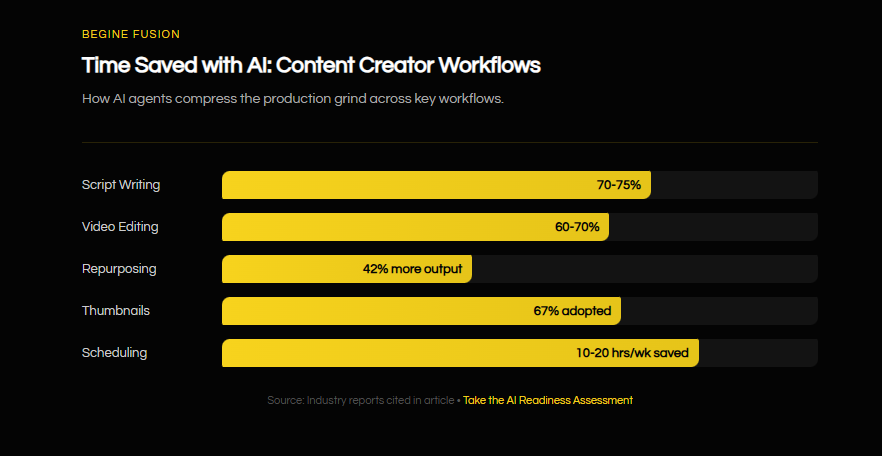
The numbers tell a clear story. Ninety-six percent of companies now use generative AI for content production, according to a 2025 industry survey. Among individual creators specifically, 83% report using AI tools in their workflow, with over half using it for video production. Sixty-seven percent of creators have adopted AI-powered thumbnail generators, and approximately 40% of video editors use AI-driven tools for tasks like color grading and audio enhancement.
The AI-powered content creation market was estimated at $14.8 billion in 2024 and is projected to reach $80.12 billion by 2030, growing at a CAGR of 32.5%, according to Grand View Research.
Platform-Specific Adoption
YouTube leads creator AI adoption. With over 60 million creators and 110 million channels worldwide, the platform has become the primary testing ground for AI-powered content optimization. YouTube’s native Test and Compare feature, which allows A/B testing of thumbnails and titles, is now used by 23.4% of YouTube Partner Program channels.
TikTok and Instagram creators have embraced AI primarily through repurposing tools. Platforms like OpusClip have crossed 10 million users, generating over 172 million clips that have accumulated more than 57 billion views across social platforms.
The Adoption Gap
The divide is not between creators who use AI and those who do not. It is between creators who have built systematic AI workflows and those who use AI tools in isolation. A creator who uses ChatGPT for script ideas but still manually edits, manually creates thumbnails, manually writes descriptions, and manually schedules posts is getting maybe 5% of AI’s potential value. A creator who has connected AI agents across the entire production pipeline, from ideation through publishing and performance analysis, is operating at a fundamentally different level of efficiency.
The creators falling behind are not technophobic. They are overwhelmed by tool fragmentation. The average creator uses 4 to 7 separate tools for content production. Each tool has its own interface, its own learning curve, its own subscription cost. The opportunity is not adding more tools. It is building an integrated system where AI agents coordinate across the entire workflow.
Core AI Use Cases for Content Creators
1. Script Generation and Ideation
What it does: AI script generation agents analyze your existing content performance, competitor content in your niche, trending topics, and audience engagement patterns to produce first-draft scripts tailored to your voice and format. They do not just generate text; they structure content for retention, placing hooks at the right intervals and building toward engagement peaks that match your audience’s viewing patterns.
How it works: The agent ingests your top-performing content (transcripts, analytics data, audience comments) to build a voice model. It then cross-references trending topics in your niche with search volume data and competitor gaps to identify high-potential topics. The output is a structured script with hook, retention markers, section transitions, and call-to-action placement optimized for your specific content format.
Real-world example: Poppy AI, a script generation tool for YouTube creators, has cut content planning time by 70% for its users. Creators report that AI-generated first drafts reduce the total scripting process from 3 to 4 hours down to under 1 hour, with the remaining time spent on personalization and fact-checking rather than blank-page writing.
Measurable outcome: Creators using AI script generation consistently report producing scripts in 60 to 75% less time while maintaining or improving audience retention rates, according to multiple creator tool platforms surveyed in 2025.
2. Video Editing Automation
What it does: AI editing agents handle the mechanical aspects of video production: silence removal, filler word elimination (“um,” “uh,” “like”), caption generation, jump cut creation, multi-camera angle switching, color grading, and audio enhancement. For talking-head content, podcasts, and educational videos, these agents can reduce raw footage to polished output with minimal human intervention.
How it works: The agent processes raw footage through multiple AI models simultaneously. Speech-to-text models generate transcripts and identify filler words. Audio analysis models detect silences and background noise. Computer vision models identify speaker changes and optimal cut points. The agent then applies edits based on rules you define (maximum silence duration, caption style, transition preferences) and outputs an edited timeline for review.
Real-world example: Descript’s text-based video editing approach allows creators to edit video by editing a transcript. Removing a word from the text removes it from the video. Descript users report that text-based editing reduces editing time by 60 to 70% for spoken-word content. One creator testimonial stated: “I’ll be able to at least double my content output since editing is taking one-quarter the time it used to.”
Measurable outcome: Video editing, which typically consumes 70 to 80% of total production time, can be compressed by 60 to 70% using AI editing tools, translating to 10 to 15 hours saved per week for a creator producing 2 to 3 videos weekly.
3. Content Repurposing (One-to-Many Distribution)
What it does: A content repurposing agent takes a single long-form piece of content (a 30-minute YouTube video, a podcast episode, a livestream) and transforms it into 10 or more platform-specific pieces: YouTube Shorts, TikTok clips, Instagram Reels, LinkedIn posts, Twitter threads, blog summaries, email newsletter excerpts, and audiograms.
How it works: The agent transcribes the source content, then uses natural language processing to identify the highest-value segments based on information density, emotional peaks, quotable statements, and topic shifts. It then reformats each segment for the target platform’s specifications (aspect ratio, duration limits, caption requirements, hashtag conventions) and queues them for review or auto-publishing.
Real-world example: OpusClip, the leading AI clipping platform with over 10 million users, has generated more than 172 million clips that have accumulated over 57 billion views. Creator Zach Justice (10M+ followers) used OpusClip’s automated clipping and posting to generate 10 million views in 30 days. Wake Up Warrior reported a 2x increase in average views and over 40% increase in watch time after implementing AI-powered repurposing.
Measurable outcome: Creators using AI repurposing tools report publishing 42% more content monthly while working fewer hours, with some creators saving 10 to 20 hours per week on content distribution tasks alone.
4. Thumbnail Design and A/B Testing
What it does: AI thumbnail agents generate multiple design variations for each video and run systematic A/B tests to identify which visual approach drives the highest click-through rate. They go beyond simple image generation by analyzing what visual patterns perform best in your specific niche and audience demographic.
How it works: The agent analyzes your historical thumbnail performance data alongside competitor thumbnails in your niche. It identifies visual patterns correlated with high CTR: face positioning, text overlay placement, color contrast, emotional expression type, and background composition. It generates 3 to 5 variations per video and deploys them through YouTube’s Test and Compare feature, monitoring results over 7 to 14 days before selecting the winner.
Real-world example:
Channels using systematic AI thumbnail A/B testing in 2025 saw a median CTR uplift of approximately 33%, moving from a baseline of 4.1% to about 5%, according to data compiled by Thumbly and Influencer Marketing Hub. Karen V. Kitt reported a 266% increase in YouTube shown-in-feed impressions after implementing AI-optimized thumbnails. The data also shows that high-performing thumbnails feature human faces 29% more often, achieving an average CTR of 9.2% compared to 6.1% for faceless designs.
Measurable outcome: AI-generated thumbnails with systematic A/B testing consistently deliver 20 to 35% improvements in click-through rate, with some creators reporting gains exceeding 100%. Given that a CTR improvement from 3% to 8% can translate to thousands of additional views per video, the compounding effect across a channel’s library is substantial.
5. SEO and Metadata Optimization
What it does: AI metadata agents optimize every discoverable element of your content: titles, descriptions, tags, timestamps, closed captions, and playlist organization. They treat YouTube as what it is, the second-largest search engine in the world, and optimize your content for search visibility alongside recommendation algorithm performance.
How it works: The agent monitors trending search terms in your niche using YouTube’s autocomplete data, Google Trends, and competitor keyword analysis. It generates keyword-rich titles under 60 characters, writes descriptions with strategic keyword placement in the first two lines (visible before the “Show More” fold), suggests relevant tags ordered by search volume, and creates timestamped chapters that improve both user experience and search indexing.
Real-world example:
Creators who systematically optimize metadata using AI tools report 15 to 30% increases in search-driven traffic within 90 days. The impact compounds over time because optimized older videos continue to attract search traffic months after publication, turning a creator’s back catalog into a persistent discovery engine rather than a depreciating archive.
Measurable outcome: AI-optimized metadata has been shown to increase organic search impressions by 20 to 40% within the first quarter of implementation, with the most significant gains coming from title optimization and chapter timestamp addition.
6. Audience Analytics and Performance Intelligence
What it does: AI analytics agents go beyond standard platform dashboards by identifying patterns, anomalies, and opportunities that manual review would miss. They track retention curves by content segment, monitor CTR trends across thumbnail styles, analyze traffic source shifts, and predict video performance based on historical patterns.
How it works: The agent pulls data from YouTube Analytics (or equivalent platform APIs), then applies statistical analysis and pattern recognition to identify what is actually driving performance. Rather than showing you a retention graph and leaving interpretation to you, the agent identifies that “your retention drops 15% at the 4-minute mark consistently in tutorial videos, correlating with the transition from explanation to demonstration, suggesting you should restructure that section.” It translates data into specific, actionable editorial decisions.
Real-world example:
Creators using AI-powered analytics platforms report identifying content patterns that were invisible in standard dashboards. For example, RoJo Travel discovered through AI analysis that their short-form clips were driving 50% more watch time on their long-form content than they had attributed, leading to a strategic shift in their repurposing approach.
Measurable outcome: Creators using AI analytics tools report making data-informed content decisions in minutes rather than hours, with performance improvements of 15 to 25% in key metrics (retention, CTR, subscriber conversion) within 90 days of systematic implementation.
7. Community Management and Engagement
What it does: AI community management agents monitor comments across all platforms, identify questions that need responses, filter spam, analyze sentiment patterns, generate reply suggestions in your voice, and surface recurring topics that indicate demand for future content. They turn the comment section from a time sink into an intelligence source.
How it works: The agent uses natural language processing to categorize incoming comments by type (question, feedback, praise, criticism, spam), urgency, and sentiment. It generates draft responses in your voice based on a style model built from your previous replies. For questions, it pulls relevant answers from your existing content library. It flags high-priority comments (potential collaborations, brand inquiries, negative sentiment from loyal subscribers) for personal attention while handling routine engagement autonomously.
Real-world example:
Creators managing communities across YouTube, Instagram, TikTok, and Twitter report that comment management alone consumes 5 to 10 hours per week. AI agents reduce that to 1 to 2 hours of review and approval time, while actually increasing response rates and engagement metrics because the agent operates 24/7 rather than during the creator’s working hours.
Measurable outcome: AI-assisted community management typically increases comment response rates by 3 to 5x while reducing the creator’s direct time investment by 70 to 80%, leading to measurable improvements in audience loyalty and platform algorithm favorability.
Implementation Strategy for Content Creators
Phase 1: Audit and Single Agent (Weeks 1 to 4)
Start by documenting where your time actually goes. Track one full production cycle from ideation to publishing and measure hours spent on each stage. Most creators discover that editing and repurposing consume 60 to 70% of their total production time, making those the highest-ROI starting points.
Choose one AI agent that addresses your biggest time bottleneck. For most creators, this is either video editing automation (Descript, CapCut AI) or content repurposing (OpusClip, Pictory). Do not implement multiple tools simultaneously. Master one before adding complexity.
Budget: Free tiers exist for most tools. Paid plans typically range from $15 to $50/month per tool for individual creators. Success metric: Track hours saved per production cycle. You should see a 30 to 50% reduction in the targeted task within the first two weeks.
Phase 2: Add a Complementary Agent (Weeks 5 to 8)
Once your first agent is producing consistent results, add a second that complements it. If you started with editing automation, add repurposing. If you started with repurposing, add thumbnail generation and testing. The key is building a connected workflow where the output of one agent feeds the input of another.
Begin documenting your workflow in writing. What triggers each step? What quality checks happen between agents? What requires your personal review versus what can proceed automatically? Budget: Expect total tool costs of $50 to $100/month at this stage. Common mistake: Adding too many tools at once. Each new tool requires learning time and workflow integration. Two well-integrated agents outperform five disconnected ones.
Phase 3: Build the Multi-Agent Workflow (Months 3 to 6)
Connect your agents into a coordinated system. When you finish recording, the editing agent processes the footage, the repurposing agent generates platform-specific clips, the metadata agent optimizes titles and descriptions, and the scheduling agent queues everything for optimal posting times. Your role shifts from doing the work to reviewing the work.
At this stage, add analytics and performance agents that close the feedback loop by informing your ideation and scripting agents about what content types and formats are performing best. Budget: Full-stack AI workflow costs for individual creators typically range from $100 to $300/month. For creators earning $5,000 or more monthly, this represents a 2 to 6% operational cost that typically returns 30 to 50% more content output. Result by month 6: The system should handle 60 to 70% of production work automatically, with your time focused on creative decisions, audience relationships, and strategic direction.
Phase 4: Optimize and Scale (Months 6 to 12)
With the core system running, focus on optimization. Which agent outputs need the most manual correction? Those are your training priorities. Feed corrected outputs back to the agents to improve future performance. Experiment with new content formats that were previously too time-intensive to produce. This is also where you evaluate whether AI-generated content from your back catalog (repurposed clips from older videos, updated thumbnails on evergreen content) can drive additional discovery without any new production.
Challenges and Considerations
Voice and Authenticity Preservation
The single biggest risk of AI adoption for creators is voice dilution. If every creator in your niche uses the same AI tools with default settings, the output converges toward a generic mean. Your audience followed you for your specific perspective, humor, delivery style, and point of view. Any AI implementation that erodes those qualities is net-negative regardless of efficiency gains. Mitigation: Build custom voice models by training agents on your best-performing content. Review AI outputs for voice consistency before publishing. Treat AI-generated first drafts as raw material, not finished product.
Audience Trust and Transparency
Fifty-five percent of consumers report feeling uneasy about AI-generated media, citing concerns about privacy, ethics, and misinformation. For creators whose business depends on audience trust, the transparency question is not optional. Viewers who discover AI involvement in content they assumed was human-created feel deceived, and that erosion of trust is difficult to reverse. Mitigation: Be straightforward about your AI use. Many creators have found that explaining their AI workflow actually increases audience engagement because it positions them as technically sophisticated and honest.
Platform Algorithm Uncertainty
YouTube, TikTok, and Instagram algorithms change constantly. An AI optimization strategy built around current algorithm behavior may become counterproductive after a platform update. Over-optimizing for algorithmic metrics (CTR, watch time) at the expense of genuine audience value creates fragility. Mitigation: Balance algorithm optimization with audience-first content decisions. Use AI analytics to understand your audience’s preferences, not just the platform’s current ranking signals. Algorithms change; audience trust compounds.
Quality Control at Scale
AI enables you to produce more content faster. But faster production of mediocre content damages your brand more than slower production of excellent content. The temptation to let AI agents publish without adequate review is real, especially when the system is working and the output looks “good enough.” Mitigation: Never let the system publish without a human quality checkpoint. Define clear quality standards in writing. If an AI-generated clip does not meet the standard you would apply to manually created content, do not publish it. Speed without quality is noise.
Copyright and Intellectual Property
AI tools trained on copyrighted content raise ongoing legal questions. Using AI to generate music, images, or voice clones that approximate copyrighted material exposes creators to potential DMCA claims and platform penalties. The legal landscape is still evolving, and what is technically possible with AI is not always legally permissible. Mitigation: Use AI tools with clear content licensing terms. Avoid generating content that imitates specific copyrighted works or creator styles. When using AI-generated music or images, verify the licensing status through the tool provider’s terms of service.
Results and Outcomes
Creators who have implemented systematic AI workflows report the following measurable outcomes:
- 42% increase in monthly content output while maintaining or reducing total working hours (MindStudio creator survey, 2025)
- 60 to 70% reduction in video editing time through text-based AI editing tools like Descript, translating to 10 to 15 hours saved weekly for multi-video creators
- 20 to 35% improvement in click-through rates from AI-generated and A/B-tested thumbnails, with some creators reporting gains exceeding 100% (Thumbly/Influencer Marketing Hub, 2025)
- 10 to 20 hours saved per week on content repurposing and distribution through automated clipping tools (OpusClip user data, 2025)
- 266% increase in YouTube shown-in-feed impressions reported by creator Karen V. Kitt after implementing AI-optimized thumbnails
- 2x increase in average video views reported by Wake Up Warrior after implementing AI-powered content repurposing, with watch time increasing over 40%
- 70% reduction in content planning time for creators using AI script generation tools like Poppy AI
Takeaways
If you are a solo creator producing 1 to 2 videos per week, start with video editing automation. The time savings are immediate and measurable, and you will reclaim the hours you need to invest in the next phase of your AI implementation.
If you are a creator with a small team (1 to 3 people), start with content repurposing. Your team is probably already handling editing adequately, but you are leaving distribution value on the table by not systematically converting long-form content into platform-specific short-form pieces.
If you are a creator earning over $10,000 per month, invest in the full multi-agent workflow within 90 days. At your revenue level, the efficiency gains from a coordinated AI system will pay for themselves within the first month, and the compounding effect of more content reaching more platforms with better optimization will accelerate growth measurably.
If you are a podcast host or audio-first creator, start with repurposing and metadata optimization. Your long-form audio content is a goldmine of short-form video material that AI can extract and format at a fraction of the time manual editing would require.
Frequently Asked Questions
Will AI make my content feel less authentic?
Only if you let it. AI generates first drafts and handles production mechanics. Your voice, opinions, experiences, and personality are what your audience follows you for, and those elements must remain human. The most successful AI-adopting creators use these tools to amplify their authentic voice across more platforms, not to replace it with generic output. If your published content sounds like it was written by a machine, the problem is your review process, not the technology.
How much does a full AI content workflow cost?
For individual creators, a complete AI toolkit (editing, repurposing, thumbnails, metadata, analytics) runs between $100 and $300 per month depending on the tools and usage tiers selected. Most creators start with a single tool at $15 to $50 per month and expand over 3 to 6 months. At current pricing, a creator producing 2 to 3 videos per week who saves 15 hours weekly through AI tools is effectively paying $1.50 to $5 per hour for that labor, far below any human equivalent.
Can AI help me grow my channel from zero, or is this only useful for established creators?
AI tools are actually more impactful for smaller creators because they eliminate the resource disadvantage. An established creator with a team of 5 already has editing, thumbnails, and distribution covered. A solo creator starting from zero has to do everything themselves, and AI agents close that gap. The caveat: AI cannot create audience affinity from nothing. You still need a clear niche, a differentiated perspective, and consistent output. AI makes the consistent output part dramatically more achievable.
What happens to my content if the AI tools I rely on shut down or change pricing?
This is a legitimate risk. Build your workflow with interoperability in mind. Avoid tools that lock your content or data in proprietary formats. Export your training data, templates, and workflow documentation regularly. The AI tool market is consolidating rapidly, and the tools available today will not all exist in their current form two years from now. Owning your process documentation means you can migrate to new tools without starting from scratch.
Sources and References
- 83% of creators use AI in workflows: Digiday creator industry report, 2025
- AI in creator economy market size ($4.35B in 2025, $12.85B by 2029): GlobeNewsWire, January 2026
- Creator economy valued at $214.37B in 2026: Research Nester market forecast
- 207+ million content creators worldwide: DemandSage creator economy statistics, 2026
- Generative AI content creation market ($14.8B in 2024, $80.12B by 2030): Grand View Research
- 96% of companies use generative AI for content production: industry survey, 2025
- 67% of creators adopted AI thumbnail generators: Thumbly industry analysis, 2025
- 40% of video editors use AI tools: Gudsho video editing statistics, 2026
- YouTube Test and Compare used by 23.4% of Partner channels: Influencer Marketing Hub, 2025
- OpusClip: 10M+ users, 172M clips, 57B views: OpusClip platform data, 2025
- Zach Justice 10M views in 30 days: OpusClip case study
- Wake Up Warrior 2x views, 40% watch time increase: OpusClip case study
- Karen V. Kitt 266% impression increase: OpusClip creator testimonial
- Descript editing time reduction 60-70%: Fritz AI review, 2025
- Video editing consumes 70-80% of production time: MindStudio industry analysis
- Poppy AI 70% reduction in planning time: Poppy AI platform data
- Median CTR uplift 33% from A/B testing: Thumbly/Influencer Marketing Hub, 2025
- Thumbnails with faces: 9.2% vs 6.1% CTR: Banana Thumbnail A/B testing data
- 55% of consumers uneasy with AI media: consumer survey, 2025
- 42% more content published monthly: MindStudio creator survey, 2025
Take the Systems Readiness Assessment
Not sure where AI fits in your content operation? The Systems Readiness Assessment helps you identify your highest-impact opportunities in under 5 minutes. It maps your current workflow against proven AI use cases and shows you exactly where to start for maximum time savings and output improvement.
Take the assessment at beginefusion.com/systems-readiness-assessment