
How to Audit a Business Software Stack
Nobody sets out to build a complicated software stack. It arrives one reasonable decision at a time. Somebody needs to send a proposal, so they buy a proposal tool. Somebody needs to book meetings, so they buy a scheduler. Each purchase is defensible on the day it happens. The stack is what those decisions look like three years later, viewed all at once.
An audit is that view. Not a cost-cutting exercise, though it usually finds money. It is the exercise of finding out what you actually own.
TL;DR
- Start from the money, not from memory. The card statement and the expense ledger know about tools nobody remembers buying. A list built by asking people is a list of the tools people like.
- Cost per tool is the wrong number. Cost per outcome is the right one. Four tools at forty dollars are not a problem. Four tools doing the same job are.
- Usage beats opinion. Every vendor admin panel reports last login. That single column settles more arguments than any survey of the team.
- Look for the same record in two places. Overlap in features is tolerable. Overlap in data is what costs you, because somebody is reconciling it by hand.
- Every tool ends in one of four decisions: keep, consolidate, replace, cancel. An audit that ends in a document instead of four lists was an inventory.
- Cancel last, not first. The subscription is the cheapest part. The process running on it is the expensive part, and it does not stop when the licence does.
What an audit is for
The reason to do this is rarely the reason people give for doing it.
The stated reason is cost. Software spend crept up, somebody noticed, and now there is a project to bring it down. That is a fine trigger and a poor objective, because the biggest line items are usually the ones you need most, and the savings sit in tools too small to be worth a meeting.
The real return is somewhere else. When two systems hold the same customer, somebody is keeping them in agreement, and that person is not on the invoice. When a tool has three users out of twenty licences, you are not wasting the seventeen seats so much as running a process that seventeen people are doing some other way. When nobody can say which system is authoritative for a phone number, every outbound message carries a small risk of being wrong.
Those are the findings worth having. The cancelled subscriptions are a side effect.
Step one: build the list from the money
Ask a team to list the software they use and you will get the software they like. The tools that matter for an audit are the ones nobody mentions, because nobody mentioning them is the whole finding.
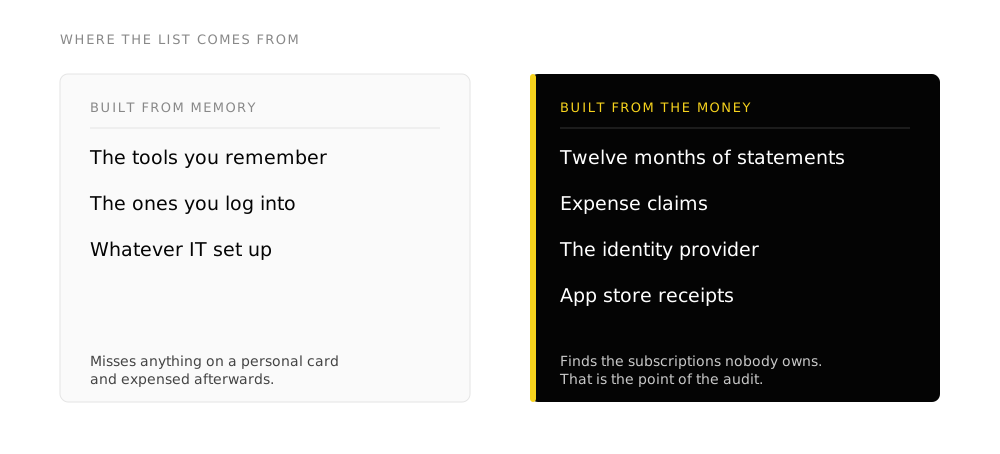
Three sources, in this order:
-
Twelve months of card and bank statements
Twelve, not three, because annual renewals hide in a single month. Filter for the recurring charges and the small ones. A tool charging nine dollars a month for two years is easy to look past and it is exactly the kind of thing an audit exists to surface.
-
Expense claims
Anything a person bought on a personal card and expensed. These are the tools with no admin account, no owner and no offboarding, and they are usually holding real business data.
-
Your identity provider or email domain
Whatever people sign in with, whether Google, Microsoft or an SSO tool, has a record of the third-party applications that have been granted access. That list frequently contains things the finance record does not, because a free tier costs nothing and still holds your data.
Only after those three do you ask people. By then the question has changed from “what do you use” to “what is this, and who owns it”, which is a much more productive conversation.
Step two: the columns that make it an audit
An inventory becomes an audit at the point it can support a decision. That takes seven columns, and the last three are the ones usually missing.
The obvious column. Note the vendor separately, because consolidation opportunities often appear as three products from one company.
Everything converted to a yearly figure in one currency. Monthly and annual billing side by side in the same table makes a cheap tool look expensive and hides the opposite.
Two numbers, not one. The gap between them is the fastest money in the exercise and the easiest to verify.
Available in nearly every admin panel and almost never looked at. A tool where the most recent login is four months old is not in use, whatever anyone says in the meeting.
One sentence, in your words rather than the vendor's. "Sends the renewal reminder" is a job. "Customer engagement platform" is a category, and categories are what make two overlapping tools look different.
Which records live here: contacts, deals, invoices, documents, tickets. This is the column that finds the duplication.
A named person, not a department. If no name can be attached, that is a finding in itself, and the renewal date tells you when you have leverage.
The column that does the most work
The job it does, written in your own words. Two tools described by their marketing categories always look like different products. Two tools described by what they actually do in your business frequently turn out to be the same sentence written twice. That is the entire finding, and a vendor's own copy will never give it to you.
Step three: find the same record in two places
Feature overlap is normal and mostly harmless. Your project tool can send an email and so can your CRM. Nobody is hurt by that.
Data overlap is different, and it is what an audit is really hunting.
- The same contact maintained in the CRM, the email platform and the accounting system, with no shared identifier between them
- A customer's status stored in two systems where either one can be updated without the other knowing
- Documents that exist in a file store, an email thread and a document tool, with no way to tell which is current
- A pipeline in the CRM and a spreadsheet next to it, because the spreadsheet has a column the CRM never got
- Two systems that both send email to customers, neither of which knows what the other sent
Each of those has a person attached to it. That is the point. The cost of a duplicated record is not storage, it is the time somebody spends keeping the copies in agreement and the errors that reach a customer when they fail to.
The test is simple: pick a customer, and ask how many systems hold something about them that would need to change if they changed their address. If the answer is more than one and there is no automatic connection between them, you have found the expensive kind of overlap.
Step four: four decisions, no fifth option
Every tool on the list ends in exactly one of these. An audit that ends in “we should look at this” for anything has not finished.
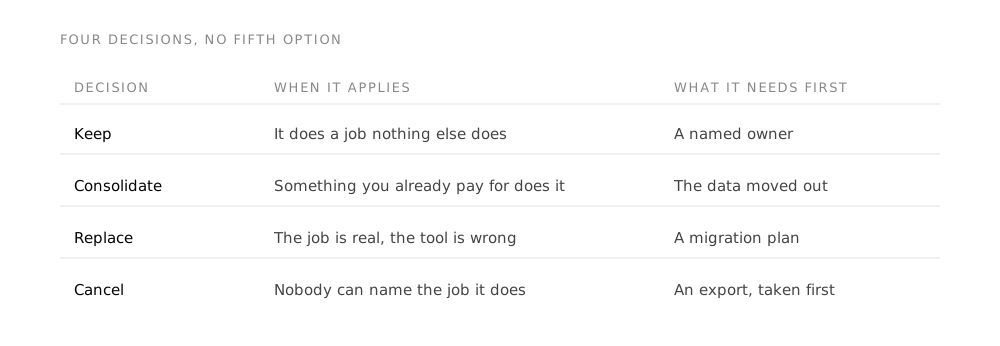
- Keep. It does a job, people use it, nothing else does the same job. Note the renewal date and move on.
- Consolidate. Something you already pay for does this job too. The work is migration and habit, not procurement, and it is usually harder than it looks.
- Replace. The job is real, the tool is wrong. This is the only decision that costs money, and it should be a small minority of the list.
- Cancel. Nobody uses it, or the job stopped existing. Export the data first, always, and check what breaks when access ends.
The ratio tells you something. If most of the list is “keep”, the stack is healthier than it felt and the problem is somewhere else, usually in how the systems connect. If most of it is “consolidate”, you are paying for capability you already own twice. If most of it is “cancel”, the finding is not about software at all, it is that purchasing has no owner.
What to do before you cancel anything
Cancelling is the visible step and the one most likely to cause damage, because a subscription is never only a subscription.
-
Export the data, and open the export
Downloading a file is not the same as having your data. Open it, check the fields survived, and check the attachments came with it. Most exports drop something, and you find out which thing after the account closes.
-
Find what points at it
Forms on your website, calendar links in email signatures, automations in other tools, links in documents you have sent customers. A cancelled scheduling tool takes every meeting link with it, including the ones in signatures nobody has updated since.
-
Name where the job goes instead
The work does not stop when the tool does. If nobody can say which system now does this, the tool comes back within a quarter, usually under a different name and on somebody's personal card.
-
Cancel at the renewal, not the moment
You have usually already paid for the term. Use it as the migration window instead of paying twice for the overlap.
How often, and by whom
Once a year, tied to the budget cycle, run by one named person with access to the finance record. Anything more frequent turns into administration. Anything less and the stack drifts far enough that the audit becomes a project rather than a task.
The one rule worth adopting between audits: every new tool gets an owner and a renewal date on the day it is bought. Almost everything an audit painfully reconstructs is information somebody had at the moment of purchase and never wrote down.
Frequently asked questions
How long does a software audit take?
The inventory is a day of work for most small and mid-sized organizations, and most of that day is spent on the twelve months of statements. The decisions take longer, because they need the people who own the processes, not just the person building the list. The part that takes real time is consolidation, which is a migration project with a habit-change problem attached, and it should be scoped separately from the audit that identified it.
What should we do about tools staff bought without approval?
Treat them as evidence rather than as a discipline problem. Somebody paid for a tool out of their own budget because a real job had no system behind it. The tool may well be the wrong answer, but the job it was bought for is genuine, and cancelling it without naming where that job goes instead is how the same purchase happens again next quarter. The governance question comes second.
Is it cheaper to consolidate into one suite?
On licensing, usually. On outcome, it depends entirely on whether the suite is good enough at the jobs you were doing with the specialist tools. A suite that covers eight jobs adequately and one job badly is a good trade when the ninth job is minor and a bad one when it is how you make money. Price the suite against the tools it genuinely replaces rather than against the whole stack, and be honest about which specialist tools you would keep anyway.
What if we cannot get usage data from a tool?
Nearly every business tool exposes last login in its user administration screen. Where one genuinely does not, use a proxy: when did anything last change in it, when did it last send something, when did a notification from it last arrive in somebody's inbox. If no proxy is available either, that is a finding about the tool.
Should we audit before or after choosing new software?
Before, and it is not close. The most common cause of a stack that needs auditing is buying a system to solve a problem that a system you already had could have solved. An audit run first changes the shopping list, and quite often removes it.
Does this apply to free tools?
Yes, and they are the ones most often missed, because the audit is usually built from the money and a free tool never appears there. A free tier that holds customer data carries the same duplication risk and the same offboarding problem as a paid one, with the added property that nobody is watching it. That is why the identity provider's list of connected applications belongs in the inventory alongside the statements.
Takeaways
- Build the list from twelve months of statements, expense claims and your identity provider before you ask anyone what they use.
- Record what job each tool does in your own words. Vendor categories hide duplication; plain descriptions expose it.
- Chase duplicated data rather than duplicated features. Somebody is reconciling it by hand and that is the real cost.
- End every tool in keep, consolidate, replace or cancel. The ratio between them tells you what kind of problem you have.
- Before cancelling, export and open the data, find what points at the tool, and name where the job goes instead.
Method
This article describes a working method rather than reporting research, so it makes no factual claims requiring a source. The one number in it is deliberate: twelve months of statements rather than three, because annual renewals appear once.
Related reading on this site: the symptoms that usually prompt an audit, what the main productivity suites cost a Canadian buyer, and what digital adoption means once you have decided what to keep.