
Nine Signs a Business Has Too Many Software Tools
The question is never really “how many tools is too many”. A ten-person company running twenty-five tools that talk to each other is in better shape than one running six that do not.
Too many tools is a condition with symptoms, and the symptoms show up in how people work long before they show up on a bill. Here is what to look for.
TL;DR
- The count is not the problem. The problem is tools that hold the same data and do not talk, which produces manual reconciliation nobody has budgeted for.
- The clearest single sign is copy-paste between two screens. Every instance of it is an integration that was never built, being paid for in salary instead.
- The second clearest is two answers to the same question. If "how many customers do we have" depends on who you ask, you do not have a reporting problem, you have a system-of-record problem.
- Watch what happens when someone is away. Work that stops when one person is on holiday is running on a tool only they can use, or on no tool at all.
- Spreadsheets next to systems are a specification. The columns in that spreadsheet are the fields the real system was missing.
- Adding a tool is the usual response and it is usually wrong. Most of these symptoms are caused by systems that do not connect, and another system does not fix that.
1. Somebody copies data from one screen into another
This is the plainest sign and the easiest to miss, because the people doing it stopped noticing years ago. It looks like ordinary work. A deal closes in the CRM and somebody types the customer into the accounting system. A form comes in and somebody moves it into the project tool.
Every one of those is an integration that was never built. You are paying for it in salary rather than in software, at a worse rate, with a higher error rate, and it gets more expensive as you grow rather than less.
The way to find it is to ask people what they do at the start of the day rather than what tools they use. The copying is invisible in a tool list and obvious in a description of a morning.
2. Two systems give two answers to the same question
How many active customers do we have. What is this month’s pipeline. Which members are current.
If the answer depends on which system you ask, or which person, the business has no system of record for that fact. Reporting is downstream of this and cannot fix it. Neither can a dashboard tool, which will faithfully show you both numbers.
3. There is a spreadsheet next to the system
Not instead of the system. Next to it. Somebody exports from the CRM every Monday, adds three columns, and works from the spreadsheet all week.
Read those three columns carefully, because they are a specification. They are the fields the system does not have, and the person built them by hand rather than asking for them. The spreadsheet is not the failure. It is the workaround that has been quietly documenting the failure, in some cases for years.
4. Onboarding a new person takes weeks and nobody can list the steps
When a new starter needs access to eleven tools and the list of eleven only exists in one person’s head, the stack has outgrown its own documentation. The tell is that the list gets reconstructed every time, and every time it is slightly different, so the last three hires all have subtly different access.
The same problem runs in reverse and matters more. When somebody leaves, the accounts that get closed are the ones somebody remembers.
5. Work stops when one person is away
Every business has key people. What matters here is the specific shape: a process that stops entirely because one person is the only one who knows which tool it runs in and what the steps are.
Renewals, invoicing, reporting, payroll adjustments. These are the ones that most often turn out to be running on a personal system rather than a shared one.
The holiday test
Take any recurring process and ask what happens to it during a two-week absence. If the honest answer is that it waits, the process is running on a person. If it is that somebody else picks it up from a written procedure and the same system, it is running on a system. Most organizations have a mix, and the value of asking is finding out which processes are in which group before you find out the hard way.
6. Customers get contacted twice, or not at all
Two tools that both send email to customers, neither aware of what the other sent. A renewal reminder that goes to somebody who paid last week. An onboarding sequence that keeps running after the customer has already been onboarded by a person.
This is the version of the problem that reaches customers, which makes it the most expensive one and usually the last one found, because it does not show up internally. Nobody inside the business sees the third reminder.
7. Nobody can say who owns a tool or when it renews
Ask who owns the scheduling tool. If the answer is a department rather than a person, or a pause, the tool is running unmanaged. It will renew automatically, it will not be reviewed, and when it breaks the first fifteen minutes go on working out whose problem it is.
Renewal dates are the other half. Without them you have no leverage with a vendor and no moment in the year when a decision is naturally due.
8. New tools arrive to fix problems old tools were bought for
The pattern looks like this. A CRM is bought and set up incompletely, so it does not do the reporting. A reporting tool is bought to sit on top of it. The reporting tool needs clean data, so a data tool is bought. Three purchases, one unsolved problem.
The signal is a purchase justified by a shortcoming in a system you already own. That is sometimes the right call. It is much more often a configuration problem being solved with procurement, because configuration is somebody’s job and procurement is a budget line.
9. Nobody uses the thing you bought last year
Licences assigned and never logged into. A tool that three people out of twenty adopted. A rollout that had training, and enthusiasm, and then quietly stopped.
This is the sign that the problem is not the stack at all. A tool nobody uses was not a bad purchase, it was an unfinished one. The licences were bought and the adoption work was not. Buying a different tool repeats it exactly.
What the symptoms have in common
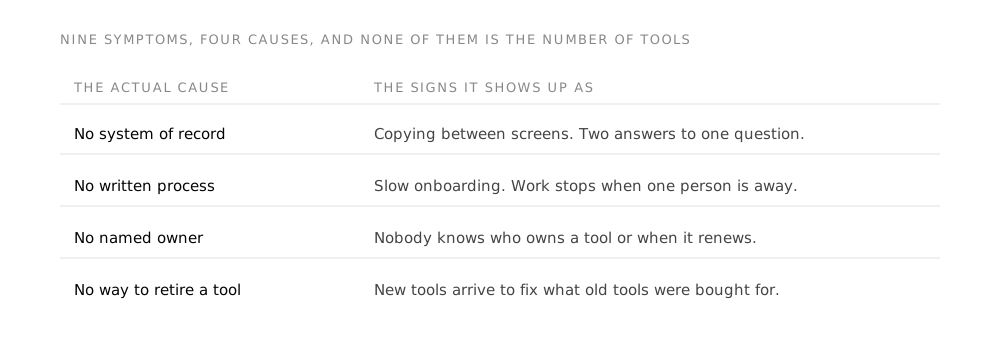
Signs 1, 2, 3 and 6. The cost is manual reconciliation and the errors it fails to prevent. The fix is integration and a decided system of record, not fewer tools.
Signs 4 and 7. The cost is that nothing gets reviewed, renewed deliberately, or shut down properly. The fix is a name and a date per tool, applied at purchase.
Signs 5 and 8. The cost is fragility and it is invisible until somebody is unavailable. The fix is writing the process down before choosing what runs it.
Sign 9, and it is the one that repeats. The cost is the entire purchase. The fix is treating rollout as the project rather than as the last week of it.
Notice what is absent from all four: the number of tools. You can have every one of these problems with six tools and none of them with thirty.
What to do about it
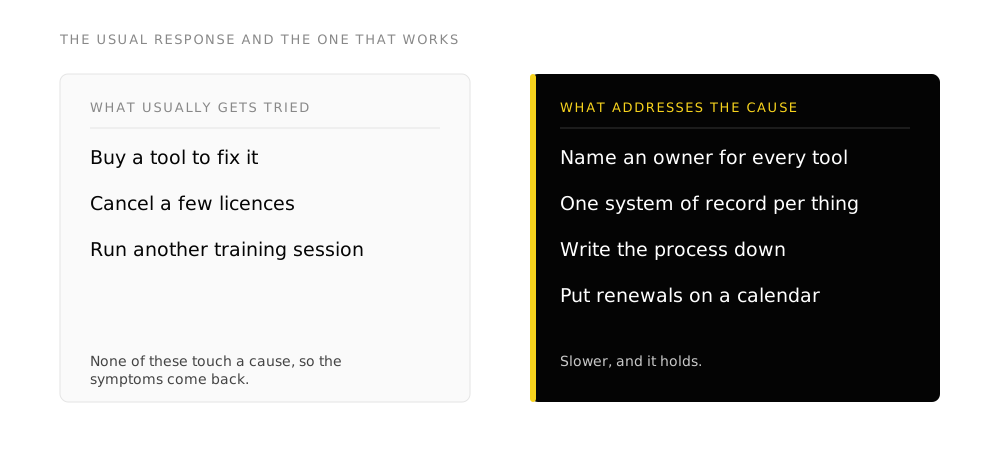
- Count the handoffs, not the tools. Every place a person moves data between two systems is one line of the actual problem. Write them down as you find them.
- Decide the system of record for each core thing. Customer, invoice, document, project. One system is authoritative for each, and the others read from it. This decision is free and it settles most of the disagreements above.
- Audit the stack properly. Build from the money rather than from memory, and record what job each tool does in your own words.
- Connect before you consolidate. Integration is often cheaper and much less disruptive than migration, and it removes the symptom that is actually costing you.
- Resist the ninth tool. If the justification for a purchase is a gap in something you already own, price fixing the thing you own first.
Frequently asked questions
How many software tools should a business have?
There is no defensible number, and anyone quoting one is quoting it about a different business. The useful question is how many of your tools hold data that also lives somewhere else with no automatic connection between them. That count should be as close to zero as you can get it, and it is the count that actually costs money.
Is it better to use one suite or several specialist tools?
A suite removes the integration problem by default, which is worth a great deal, and it is usually weaker at any specific job than the specialist built for it. The trade turns on which jobs are core to how you make money. Keep specialists where the work is differentiating and take the suite everywhere else, then be strict about the connection between the two.
We know we have too many tools but cancelling them feels risky. Where do we start?
Start with the handoffs rather than the cancellations. Pick the single place where somebody copies data between two screens most often and remove that one, either by connecting the systems or by deciding one of them is no longer authoritative. It is lower risk than a cancellation, it returns time immediately, and it tells you a great deal about which system people actually trust.
Our team likes their tools. Is consolidating worth the disruption?
Sometimes not. Preference is real information, and a tool people willingly use is doing something the alternative may not. The case for consolidating is strong when the tool holds duplicated data or when it is a single point of failure, and weak when it is simply one more line on an invoice. Take the first case and leave the second.
How do we stop the stack sprawling again?
Two habits, both small. Every new tool gets a named owner and a renewal date on the day it is bought. And every purchase justified by a gap in an existing system gets one conversation first about whether the existing system could be configured to close it. Neither requires a policy document, and together they prevent most of what an audit later has to untangle.
Takeaways
- The number of tools is not the diagnostic. Duplicated data with no connection between the copies is.
- Copy-paste between two screens is the clearest single symptom, and it is an integration being paid for in salary.
- Two answers to the same question means no system of record, which no dashboard can fix.
- A spreadsheet next to a system is a specification for the fields that system is missing.
- A tool nobody uses was an unfinished purchase, not a wrong one. Replacing it repeats the mistake.
Method
This article describes symptoms and their causes from delivery experience. It makes no statistical claims and cites no research, because the figures commonly quoted about software sprawl trace back to vendor surveys promoting consolidation products and cannot be verified independently.
Related reading: how to audit the stack, what digital adoption means, and the six signs an organization has outgrown its spreadsheet.