
How to Choose a CRM: A Decision Method, Not a Feature Comparison
Most CRM selections are decided in the demo. Somebody sees a well-run walkthrough of a product handling a clean example, it looks like a solution, and the rest of the process is a search for reasons to confirm it.
That is not a criticism of demos. A demo is a sales tool doing its job well. It is a criticism of starting there, because the demo is designed to answer questions you have not written down yet, which means it gets to choose them.
This is the order that produces a decision you can defend in a year.
Earlier in the decision
This article assumes you have decided you need a CRM. If you have not, start with what a CRM actually is and the six signs an organization has outgrown its spreadsheet. For what the options cost a Canadian buyer with the numbers verified, see the CRM buyer's guide.
TL;DR
- Write requirements before you book a demo. Not a feature list. A description of your sales process and the questions you cannot currently answer.
- Separate must-have from nice-to-have before anyone sells to you. Every CRM has an impressive feature you did not know you wanted, and wanting it is how the shortlist grows to nine.
- Test with your own data, in its real state. A trial run on the vendor's sample data tells you the product works. It tells you nothing about whether it works on your mess.
- Price the whole thing. Licences, the tier you actually need, mandatory onboarding fees, the integrations, the currency, and the internal time. The per-seat number is the smallest part.
- The people who will use it daily must be in the trial. Not a demo audience. Actual use, on real records, for a fortnight.
- Choose for the business you are, plus about two years. Buying for a size you might reach adds complexity you carry from day one for a benefit that may never arrive.
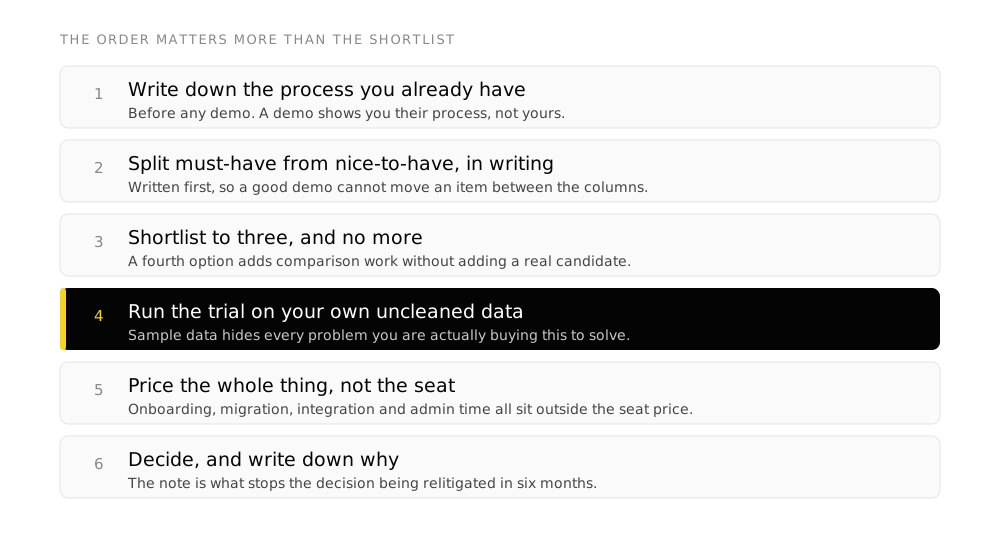
Step one: write down the process you already have
Before any product enters the conversation, describe how a customer currently moves from first contact to closed, in your own words, using your own stage names.
It sounds like a formality. It is the whole exercise, for two reasons. Every CRM makes assumptions about your process, and you cannot judge whether those assumptions fit unless yours is written down. And the act of writing it usually reveals that different people in the business describe it differently, which is a problem no software fixes and every software rollout exposes.
Capture these:
- The stages, in your language. What has to be true for something to move from one to the next.
- Who does what at each stage. If two people would answer differently, resolve it now rather than in configuration.
- Where leads come from. Website, referral, events, outbound, partners. Each source is an entry point the system has to handle.
- What you sell, and how. One-off, recurring, retainer, project. This determines more about the fit than any feature does.
- What happens after the sale. Onboarding, delivery, renewal. A CRM that ends at the close is wrong for anything that renews.
- The questions you cannot currently answer. These are the actual requirements. Everything else is preference.
Step two: split must-have from nice-to-have, in writing, first
Do this before the first demo and do not revise it during one.
A must-have is something where, if the product cannot do it, the product is out. That is a high bar and the list should be short, usually four to eight items. If your must-have list runs to thirty, you have written a wish list and it will not discriminate between anything.
Useful test for each item: can the business run without this for a year? If yes, it is a nice-to-have, whatever it feels like.
The reason to fix this in advance is that every product you see will demonstrate something genuinely impressive that was not on your list. Some of those are worth reopening the list for. Most are the reason selections take four months and end in the most expensive option.
Step three: shortlist to three, and no more
Three is enough to see real difference and few enough to evaluate properly. Above three, the evaluation gets shallower per product, which means the decision reverts to the demo quality, which means you are choosing a sales team.
Build the shortlist on the must-haves alone. Price comes next, not here. A product that cannot do a must-have is not cheap, it is irrelevant.
Usually a specialist, or something built for your sector. Fits well now, may constrain you later.
Configurable rather than prescriptive. More work to set up, more room to change your mind later.
The CRM inside a suite you already pay for. Frequently overlooked and occasionally the right answer, because integration is already solved.
Step four: run the trial on your own data
This is the step that gets skipped, and skipping it is the single most reliable predictor of a CRM that gets abandoned.
A trial on the vendor’s sample data demonstrates the product. A trial on your data demonstrates the fit. Your data has duplicate contacts, inconsistent company names, three formats of phone number and deals that have been open for two years. That is the material the system has to work with, and how a product behaves when the data is imperfect is a real characteristic of it.
-
Import a real slice
A few hundred records, exported from wherever they live now, without cleaning them first. The cleaning is part of what you are evaluating.
-
Configure your actual stages
Not the default pipeline. Yours, with your names. If this is hard in the trial it will be hard forever.
-
Run live work through it for two weeks
Real deals, by the people who will use it. In parallel with the current system, which is duplicated effort and the only way to get an honest read.
-
Try to answer your unanswerable questions
The ones from step one. This is the test that matters and it is the one no demo covers, because it needs your data in the system.
-
Connect one integration
Email at minimum, and whichever other system is unavoidable. Integrations are always described as available and vary enormously in what that means.
The question to ask the people in the trial
Not "do you like it". Ask: did you use it without being reminded? A CRM that requires reminding during a two-week trial, while people are being watched and the novelty is fresh, will not be used in month six. That single answer predicts adoption better than any feature score.
Step five: price the whole thing, not the seat
The per-seat headline is the most quoted and least useful number in this decision. Four things routinely change the real figure:
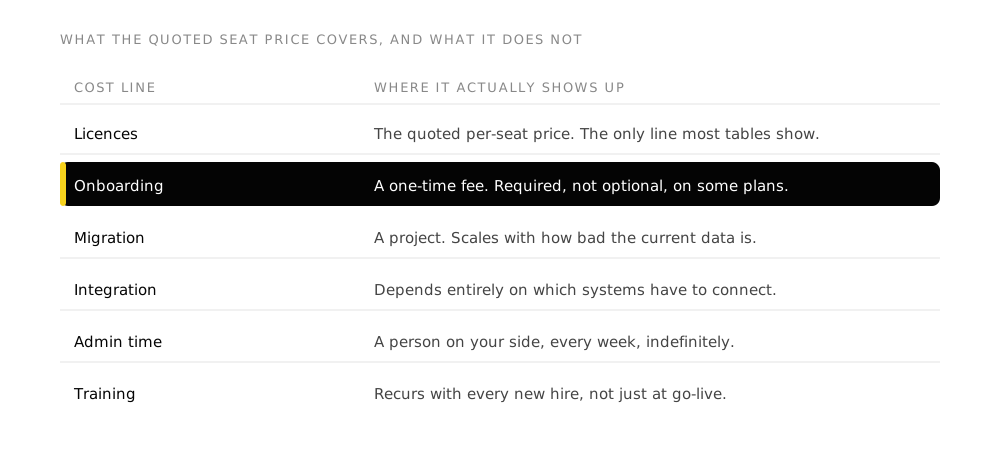
- The tier you actually need. The advertised price is usually the entry tier. Check which tier holds your must-haves, and price that one.
- Mandatory onboarding fees. Some vendors require a paid onboarding package on higher tiers. Required, not optional, and it does not appear in per-seat comparisons.
- Currency. A Canadian buyer quoted in US dollars is exposed to the exchange rate for the life of the contract. Some vendors do not offer CAD at all on their Canadian pages.
- Implementation and internal time. Configuration, migration, training. This is real cost whether it is invoiced or absorbed, and it is frequently the largest line in year one.
The verified numbers for the main options in Canadian dollars are in the buyer’s guide, including which vendors quote in USD and which charge a required onboarding fee. They are kept there rather than repeated here, so there is one place to maintain when they change.
Step six: decide, and write down why
Record the decision and the reasoning while it is fresh: which must-haves decided it, what you gave up, what you deferred.
This costs ten minutes and pays twice. Six months in, when somebody hits the limitation you knowingly accepted, the note is the difference between a known trade-off and a mistake. And when the contract comes up for renewal, it is the only record of what you were actually buying.
Where CRM selections go wrong
- Booking demos before writing requirements, so the vendor sets the criteria
- Letting the shortlist grow past three, which makes every evaluation shallower
- Trialling on sample data, which tests the product rather than the fit
- Excluding the people who will use it daily until after the contract is signed
- Comparing entry-tier prices when your must-haves live two tiers up
- Buying for the company you hope to be in five years and carrying the complexity from day one
- Treating the selection as the project, when configuration and adoption are the project
- Choosing on integrations that are listed rather than tested
Frequently asked questions
How long should choosing a CRM take?
For a small or mid-sized business, four to six weeks is comfortable: a week on requirements, a week to shortlist, two weeks of parallel trial, and a week to decide. Faster than that usually means the trial was skipped. Much longer and the requirements drift, people lose interest, and the decision gets made by whoever is still in the room.
Should we choose the CRM inside a suite we already pay for?
It belongs on the shortlist and it should not be assumed. The advantage is real: shared identity, shared data, one invoice and integration already solved. The risk is choosing it because it is there rather than because it fits, which produces the same abandoned system as any other bad fit. Put it through the same trial as the others and let it win or lose on that.
Do we need a CRM built for our industry?
Only if your process is genuinely unusual, and most are not as unusual as they feel. A sector-specific product arrives already understanding your vocabulary and your stages, which saves configuration and constrains you where your model differs. A general platform costs configuration and adapts. The test is whether the terms in your process description exist in the general product's vocabulary. If they translate cleanly, take the general platform.
What if the team resists the whole idea?
Find out what they think it is for. Resistance to a CRM is almost always resistance to being monitored, or an accurate memory of a previous system that added work and returned nothing. Both are answerable, and neither is answered by a better product. Involve the people who will use it in the trial and let the choice be partly theirs, which is also the cheapest adoption work available.
Can we start free and upgrade later?
Yes, and it is a reasonable route for a small team, with one caution. Check what the free tier omits and confirm the migration path to a paid tier inside the same product, because "free" and "paid" are occasionally different products with an export in between. Where the free tier is genuinely the same product with limits, starting there is a low-risk way to test adoption before committing budget.
How much should we budget beyond licences?
We publish a fixed figure for our own Zoho CRM setup work rather than a general range, because a general range would be invented. What is safe to say is the shape: configuration, data migration and training are a distinct cost from licensing, they land in the first quarter, and a plan that budgets only for seats is a plan for a system nobody has been taught to use. Ask any prospective implementer for a fixed scope rather than an estimate.
Takeaways
- Write your process and your unanswerable questions before you book a demo. Those questions are the requirements.
- Fix must-have versus nice-to-have in writing, before anyone sells to you.
- Shortlist three. More than three makes every evaluation shallower and hands the decision to the best demo.
- Trial on your own uncleaned data, with the people who will use it, on live work, in parallel.
- Price the tier you need, plus onboarding fees, currency exposure and implementation time. Not the headline seat rate.
- Write down why you chose it and what you accepted. It is the only record when the limitation surfaces later.
Sources
This article is a method and makes no vendor claims requiring verification. The pricing statements it refers to, on required onboarding fees and USD-only Canadian pricing, are documented with sources in the CRM buyer’s guide, verified 8 August 2026.
Next: the implementation guide for what happens after the decision, and CRM data migration for the part that most often goes wrong.