
CRM Data Migration: How to Move Records Without Moving the Mess
A CRM project is judged in the first week people use it. If a rep opens the new system, searches for a customer they spoke to last month and finds nothing, or finds three of them, the verdict is formed and it does not get revisited. Everything after that is an uphill argument.
Which makes migration the highest-stakes and lowest-glamour part of the work. It is also the part most often scheduled as “import the data” the weekend before go-live.
Where this sits
This covers the data. For the wider project, meaning sequence, roles, timeline and cost, see the CRM implementation guide. For choosing the system in the first place, how to choose a CRM.
TL;DR
- Decide what not to move first. Migration scope is a subtraction exercise. Everything you bring costs cleaning, mapping and validation, forever.
- Deduplicate before mapping, not after. Merging duplicates in the source is difficult. Merging them in the target after they have picked up new activity is much worse.
- The field map is the document. Every source field goes to a target field, a new custom field, or a decision to drop it. No field arrives unlisted.
- Load in dependency order. Accounts before contacts, contacts before deals, deals before activities. Anything else creates orphans you have to relink by hand.
- Test with a real subset before the full load. A hundred records will surface most of the problems that ten thousand will, at a hundredth of the cleanup.
- Validate against counts you agreed in advance. "It looks fine" is not a validation. Row counts, spot checks and the ten records the team knows by heart.
Start by deciding what not to move
The instinct is to bring everything, because everything might matter and storage is cheap. Storage is not the cost. Every record you migrate has to be cleaned, mapped, loaded, validated and then lived with, and dead records in a new system do active harm: they make search results worse, they skew every report, and they teach people that the data is untrustworthy.
Reasonable things to leave behind:
- Contacts with no activity for several years and no discernible relationship
- Deals lost long ago, beyond a summary count you may want for history
- Duplicates you cannot resolve, where neither copy is clearly right
- Records with nothing but a name, so no email, no phone, no company, no history
- Notes attached to records you are not migrating
- Fields nobody has populated in two years, which are a workflow that stopped rather than data
- The contents of a mailbox, which is not CRM data however tempting the volume looks
Where history matters for compliance or reference, archive it. A read-only export in a known location satisfies almost every reason people give for migrating dead records, at none of the ongoing cost.
Deduplicate in the source, before anything else
This is the sequencing decision that costs the most when it is got wrong.
Duplicates are much easier to resolve before the move. In the source system you have the full history, one place to look, and no new activity landing on either copy. After the load, a duplicate can pick up a new note on one record and a new email on the other, at which point merging means choosing what to lose.
-
Agree what makes two records the same
Email address is the strongest single signal for people. Name plus company is weaker than it looks. Two people share a name, and one person appears under three spellings of the same company. Write the rule down before running it.
-
Normalise the fields you match on
Case, whitespace, punctuation in phone numbers, "Ltd" against "Limited", "&" against "and". Most duplicates that survive a dedupe pass survive it because the match ran on unnormalised text.
-
Decide which copy wins, by rule
Most recent activity is usually the right rule, not most recently created. Whatever you choose, apply it consistently rather than case by case, or the exercise never ends.
-
Keep what the losing copy had that the winner did not
The duplicate frequently holds the only phone number, or the only note explaining why the relationship went quiet. Merging is not deleting.
-
Hand the unresolvable ones to a human
There will be a residue the rules cannot settle. It is usually small enough for the person who knows the accounts to work through in an afternoon, and that afternoon is worth buying.
Build the field map, and let it be the specification
Every field in the source ends up in exactly one of three places: an existing field in the target, a new custom field you are creating, or a documented decision to drop it. Nothing arrives unlisted.
The map is worth building as a table, because it is the artifact the whole migration is checked against:
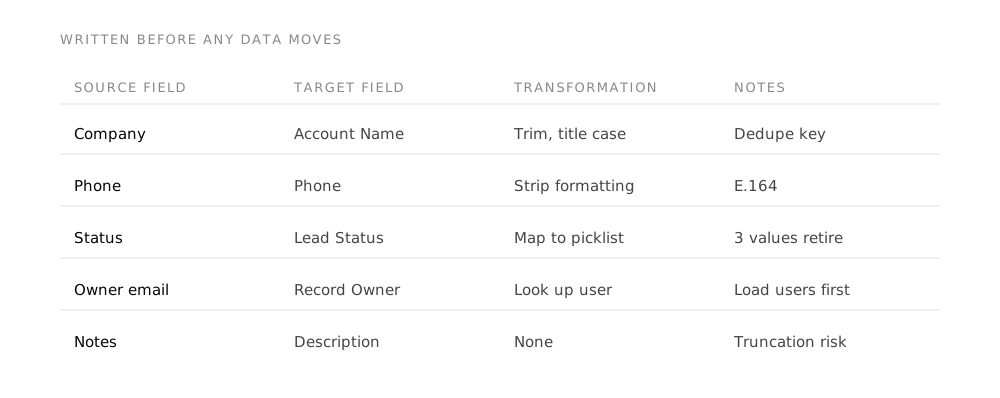
| Source field | Target field | Transformation | Notes |
|---|---|---|---|
Company | Account Name | Trim, normalise legal suffixes | Creates the Account record |
Phone | Phone | Strip formatting, prefix country code | Multiple formats in source |
Status | Lead Status | Value map, see below | Source has 14 values, target has 6 |
Owner | Record Owner | Match on email to a CRM user | Unmatched owners go to a named fallback |
Notes | Notes | Preserve author and date | Attaches to the migrated record |
Legacy ID | Custom field | None | Keep it, see below |
Three parts of that table earn their place:
Value mapping for picklists. A source status list that grew to fourteen values is mapping into a target with six. Somebody has to decide where each of the fourteen goes, and it must be somebody who knows what the values meant. Left to the migration, values get mapped by name similarity and the ones that do not match land in “Other”, which quietly destroys the reporting the CRM was bought for.
Record ownership. Every record needs an owner in the new system, matched on something reliable like email. Records owned by people who have left are the ones that produce a load full of blanks, so name the fallback owner in advance rather than at three in the morning.
The legacy identifier. Bring the source system’s record ID into a custom field. It costs one field and it is the only way to trace a record back to where it came from when something looks wrong six weeks later. This is the single most useful thing on the list and it is almost always omitted.
On dates
Check the date format and the time zone before the load, not after. A source exporting DD/MM/YYYY into a target expecting MM/DD/YYYY loads without error for every day past the twelfth of the month and silently transposes everything before it. It is the most common corruption in a migration precisely because nothing fails.
Load in dependency order
Records reference each other, and a reference to something that does not exist yet either fails or creates a duplicate stub. The order follows the relationships:
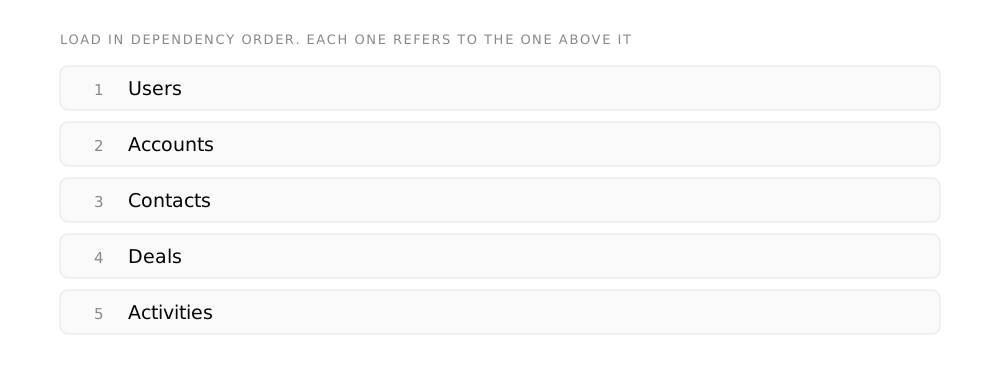
Every other record needs an owner. Create the users, with the roles and profiles they will actually have, before any data lands.
The organizational records that contacts attach to. Loading contacts first makes the system invent accounts from whatever text was in the company field.
Linked to accounts that now exist. Decide the lead-versus-contact split before the load, not during it.
Linked to both accounts and contacts. This is where a shortcut in step two shows up as deals attached to the wrong company.
Last, because they attach to everything above. Also the largest volume and the most likely to be trimmed by the scope decision.
In Zoho CRM specifically, this order matters for a reason worth knowing: converting a lead automatically creates an account, a contact and a deal from the one record. Loading leads that should have been contacts, and converting them afterwards, generates a second set of accounts alongside the ones you carefully migrated.
Test on a subset. Always.
Load a hundred records before you load ten thousand. Pick them deliberately rather than taking the first hundred: include the ugliest records you have, a few with every field populated, a few with almost nothing, the ones with unusual characters in the name, the oldest and the newest.
Then check the things that are hard to see:
- Did the relationships hold? Contacts attached to the right accounts, deals to the right contacts.
- Did the picklists land in real values? Or did a third of them arrive as "Other".
- Are the dates the dates? Check one from early in the month specifically.
- Did special characters survive? Accents, apostrophes in names, the em dash somebody pasted from Word.
- Are the owners right? Including the records whose owner has left.
- Did anything truncate? Long notes and addresses hit field length limits quietly.
Fix, clear the test records out completely, and run it again. Two or three cycles is normal and each one is cheap. The equivalent discovery after a full load is not.
Validate against numbers you agreed beforehand
“It looks fine” is not validation, and the person saying it is looking at the ten records they happen to know.
Agree the checks before the load so nobody is choosing the pass mark afterwards:
- Row counts per object, reconciled against the source minus the records you deliberately excluded. The exclusions must be a number, not a category.
- Relationship counts. How many contacts have an account. How many deals have a contact. Compare to the source.
- Field population rates on the fields that matter. If email was populated on eighty percent of source contacts and sixty percent of target contacts, something dropped.
- The famous ten. Ten records every person on the team knows by heart, checked by them personally. This catches what counts never will, and it also converts the sceptics.
- One report that must match. Pick a report the business already trusts and reproduce it in the new system. If the totals agree, people believe the system.
Where migrations go wrong
- Migrating everything because deciding what to leave is harder than moving it
- Deduplicating after the load, once both copies have new activity on them
- Mapping picklists by name similarity rather than by asking what the values meant
- Loading contacts before accounts and letting the system invent the companies
- Skipping the test load because the deadline is close, which is when it is most needed
- Not keeping the legacy record ID, so nothing can be traced back afterwards
- Running the final load and switching off the old system the same day
- Treating migration as a technical task, when every hard decision in it is a business decision about what your data means
Keep the old system readable for a while
Not running, necessarily. Readable. Give it a defined period, and a quarter is usually enough, where somebody can go back and check something.
This costs very little and removes the argument that stalls migrations: the fear that something irreplaceable is being left behind. It is much easier to agree an aggressive scope when everyone knows the source is still there to consult.
Set an end date on that access when you set it up. Otherwise the old system stays alive for years, people keep using it for the one thing it does better, and you have two systems of record again.
Glossary
- Field map
- The table that says where every field in the old system ends up in the new one, what happens to its values on the way, and which fields are deliberately dropped. Written before any data moves. It is the specification the migration is checked against.
- Deduplication
- Merging records that describe the same customer, company or contact. Done in the source system before extract, because merging in the target means doing it again on every subsequent load.
- System of record
- The one system that is authoritative for a given kind of information. Where no system of record has been decided, two systems hold the same data and neither can be trusted without reconciliation.
- Dependency order
- The sequence records must load in, driven by what refers to what. Users load before the records they own, accounts before the contacts attached to them, and so on down the chain.
- Record owner
- The user a record is assigned to. Owners are the reason users load first, and a load that cannot resolve an owner either fails or silently assigns the record to whoever ran the import.
- Cutover
- The moment the new system becomes authoritative and the old one stops being written to. Everything before it is rehearsal, and the old system stays readable afterwards.
- Truncation
- Silent loss of the end of a value when the target field is shorter than the source field. Long note and description fields are where this usually happens, and it is invisible unless the field map flags the risk in advance.
Frequently asked questions
How long does a CRM data migration take?
The load itself is usually a matter of hours. The work is what surrounds it: scoping, deduplication, field mapping and value mapping typically run one to three weeks for a small or mid-sized dataset, and the mapping decisions need people who know what the data means, which is what actually paces it. If a plan shows migration as a single day, it is showing the load and not the migration.
Should we clean the data before or after moving it?
Deduplicate before, in the source. Standardise formats during, as part of the transformation. Enrich after, in the new system, because that is where the ongoing habit has to live anyway. The distinction that matters is between structural cleaning, which is much cheaper before, and improvement, which is endless and should never block a go-live.
Can we migrate without any downtime?
For a small dataset, yes: load, validate, and switch. For a larger one the honest approach is a freeze: a defined window where the old system is read-only and nothing new is created. A few hours of freeze is far less disruptive than a week of reconciling records created in both systems while the migration ran. If a freeze is impossible, plan an explicit delta load for what changed during the window and treat it as part of the migration rather than an afterthought.
What about email history and attachments?
Ask what the history is for before deciding. If it is so a rep can see the last conversation, connecting the new CRM to the mailbox gives you that going forward without migrating anything. If it is genuinely for the record, migrate attachments for active accounts only and archive the rest. Email history is usually the largest volume in a migration and the least often consulted afterwards.
Who should own the migration?
Someone who knows what the data means, supported by someone who knows how to move it. The failure mode of an entirely technical owner is a clean load of data that is subtly wrong, because every hard decision in a migration is a business decision that looks like a technical one: which duplicate wins, where a retired status value goes, whose records the departed rep's accounts become.
What if the data is genuinely too messy to migrate?
Then migrate less of it. A CRM launched with two thousand clean, current records is a working system; the same CRM launched with twenty thousand records of unknown quality is a search box people stop trusting. Start with the accounts and contacts that are active, get the system used, and bring history in later if anyone asks for it. In practice, far fewer people ask than expect to.
Takeaways
- Scope by subtraction. What you leave behind is the most valuable decision in the project.
- Deduplicate in the source before the load, using a written matching rule and normalised fields.
- Map every field explicitly, map picklist values by meaning, and carry the legacy record ID into a custom field.
- Load users, accounts, contacts, deals, then activities. Order is not a preference.
- Test on a deliberately ugly hundred records, two or three times, before the full load.
- Validate against counts and checks agreed in advance, including ten records the team knows by heart.
Sources
The Zoho-specific behaviour described here, that converting a lead automatically creates an account, a contact and a deal, is stated in Zoho’s own documentation: “While converting leads to deals, accounts and contacts are created automatically.” Zoho CRM online help, “Working with Leads”, read 8 August 2026.
Everything else is method rather than product behaviour. Before applying the load order to a specific system, confirm its own relationship requirements, which differ between products.