
Tools vs. Systems: Why Better Software Does Not Fix a Broken Business
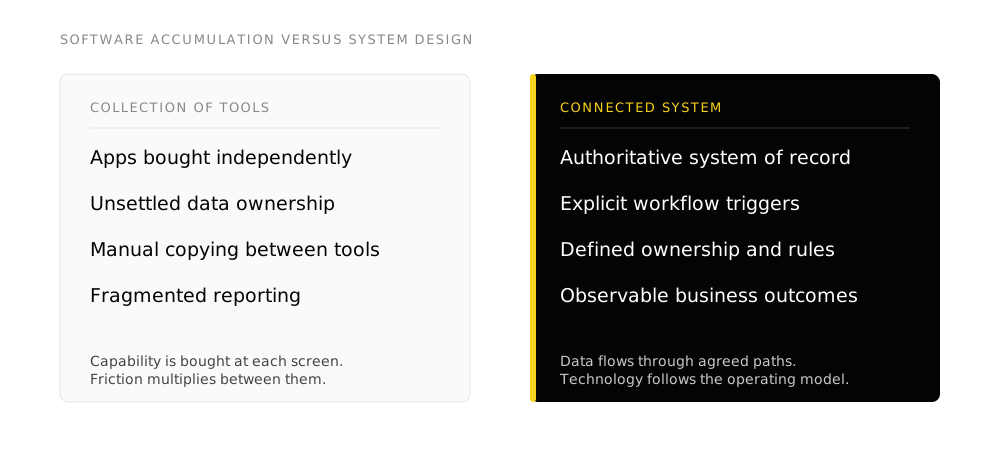
Most organizations do not have a software shortage. They have a systems problem. Adding another tool can increase capability at a single desk without improving how work moves across the company.
A tool performs an isolated task. A system connects people, processes, records, workflows, authority, and decisions to produce a consistent business result. When leadership treats operational friction as a technology selection problem, software accumulates while the underlying process stays broken.
TL;DR
- Software accumulation creates friction: Buying standalone applications adds login screens and handoffs rather than operating speed.
- Systems problems masquerade as people problems: When employees miss follow-ups or maintain spreadsheets, they are usually compensating for missing system architecture.
- A business system requires six connected layers: Process, system of record, data definitions, workflow rules, ownership, and governance.
- AI compounds the difference: Machine reasoning accelerates work across connected systems, but acts on bad data and ambiguous rules with equal speed.
- Design the operating model first: Map the work and identify authoritative sources before configuring new tools. FusionMap maps the architecture; Systems Build connects the platforms.
The software is rarely the whole problem
A sales team asks for a new CRM. Operations requests a project management platform. Marketing wants another marketing automation suite. Leadership asks for AI agents to automate coordination.
Each request sounds reasonable in isolation. The problem begins when every operational challenge is answered with a purchase order. Most companies already own enough software to handle far more volume than they currently process. What they lack is an operating system that ties those applications together.
Businesses do not operate one screen at a time. A customer enters through an online form, becomes a lead in the CRM, receives messages from marketing, advances through sales discovery, signs an agreement, triggers project onboarding, generates an invoice in accounting, and eventually surfaces in monthly reporting.
That is a single operating continuum. When each stage is procured and configured independently, the company ends up with software licenses rather than a business system.
Tool accumulation creates hidden operating costs
Buying software is easy because the utility is obvious inside the demonstration. The operational friction created between applications is much harder to see on an invoice.
A company can purchase an industry-leading CRM and still possess untrusted customer records because nobody established required fields, deduplication rules, or record ownership. It can subscribe to an automation engine and still rely on manual intervention because the underlying procedure changes every week. It can store files in cloud drives while critical operational context remains buried in direct messages and employee memories.
Individual products can be well built while the connections between them remain undefined:
- Which platform holds the authoritative customer record
- Which specific event triggers the downstream workflow
- Which department owns the handover at each stage
- What exact data payload moves between applications
- Who possesses the authority to approve an exception
- How automation failures are flagged and resolved
- Which operational metrics prove the process succeeded
Without explicit answers to those questions, software remains an expensive collection of disconnected interfaces.
A systems problem often looks like a people problem
Operational deficiencies frequently surface as complaints about staff habits:
- “The sales reps are not updating the pipeline.”
- “Client onboarding missed three critical setup steps.”
- “Finance and sales are reporting different revenue figures.”
- “Nobody knows which proposal template is the current version.”
- “We need to hire another coordinator to manage the handoffs.”
Sometimes employees lack discipline. More often, they are working around a fragmented stack that requires too much memory, duplicate entry, and informal coordination. If an employee must remember six manual steps, paste data across three browser tabs, and check a private spreadsheet to confirm account status, the company has forced system design into that individual’s memory.
Human memory does not scale. When the employee leaves or workload doubles, the process collapses. The sustainable remedy is inspecting the operating architecture rather than buying another subscription.
The system test
Ask three people in the same department to describe how a new client moves from verbal agreement to first invoice. If they describe different handoffs, name different spreadsheets, or rely on informal direct messages, you have software applications without an operating system.
The core layers of a business system
A functional business system connects several operational layers:
1. Process
The agreed sequence of tasks required to produce an outcome. This includes the standard path, known exception branches, and clear handoff criteria.
2. System of record
The single authoritative source of truth for each business domain. Customer records belong in the CRM. Billing records belong in the accounting engine. Project deliverables belong in the operational workspace. The platforms must respect these boundaries.
3. Data contracts
The required fields, validation rules, and shared identifiers that allow systems to communicate without manual translation.
4. Workflow automation
The automated handoffs, condition checks, and notifications that move work forward without requiring human coordination.
5. Explicit ownership
Named roles responsible for the maintenance of each workflow, the integrity of records, and the resolution of exceptions.
6. Governance and audit
Defined permissions specifying who can edit processes, who approves commitments, and how changes are logged.
7. Measurable outcomes
Clear operational indicators that verify whether work is moving faster, with fewer errors, and at higher quality.
AI increases the importance of system design
The expansion of artificial intelligence makes system architecture more critical, not less. AI models can summarize text, classify inquiries, draft communications, and write code. However, model intelligence cannot resolve architectural disorganization.
An autonomous agent interacting with three disconnected databases still needs to know which source is authoritative. An agent drafting client proposals still requires accurate commercial history from the CRM. An agent executing actions across APIs still requires strict permission boundaries and human review gates.
AI increases the leverage of a well-designed system because algorithms can traverse structured data and clear rules with speed. Conversely, AI amplifies the damage of a broken system by acting on dirty records and ambiguous instructions faster than any human could.
For a deeper analysis of how model capabilities interact with organizational structure, read AI Capability vs. Business Readiness and Prompting vs. Agentic Workflows.
Invert the technology procurement sequence
The default approach to operational improvement starts with the vendor:
“Which tool should we buy to fix this?”
A resilient organization reverses that order:
“What operational outcome must occur, and what system structure produces it?”
- Map the operating flow. Document the sequence of actions, decisions, and handoffs.
- Define the system of record. Establish which application holds the definitive truth for each data entity.
- Assign operational ownership. Name the individuals accountable for each step.
- Identify data handoffs. Specify the exact fields required before work moves downstream.
- Set authority boundaries. Establish what software can automate and where human approval remains mandatory.
- Select or configure the technology. Configure existing software or procure new platforms to support the verified architecture.
Sometimes the solution requires implementing a new platform through Systems Build. Often it involves reconfiguring existing tools, repairing integrations, or retiring software that creates duplicate work.
- Buying a new application before documenting the process it is meant to run
- Blaming team adoption when a tool requires double data entry
- Allowing multiple applications to claim authority over the same customer record
- Assuming an AI model will compensate for missing operational documentation
- Measuring technology success by software seat count rather than business outcome
Frequently asked questions
What is the difference between a tool and a system?
A tool performs a specific functional task, such as sending an email or storing a document. A system coordinates people, processes, authoritative records, automation, and decision rules to deliver an end-to-end business outcome.
Why does buying more software often decrease productivity?
Every independent application introduces a separate interface, data store, user permission set, and maintenance overhead. Without deliberate integration and clear data ownership, employees spend hours copying information between disconnected tabs.
How do we determine if our problem is software or process?
If you gave your team the best software on the market tomorrow and they still disagreed on handoffs, customer status definitions, or approval rules, your challenge is process and architecture rather than software capability.
Where should an organization begin fixing its systems?
Begin by mapping the primary path through which revenue and customer fulfillment move. Identify where work stalls, where data is re-entered, and which spreadsheets exist as workarounds. That diagnostic blueprint is what FusionMap creates.
Takeaways
- Software provides isolated functional capability; business systems produce repeatable operational outcomes.
- Unclear data ownership and unmapped processes create hidden friction that no software purchase can solve.
- Operational failure often looks like poor employee execution when it is actually structural system failure.
- AI models require clean system architecture, authoritative records, and explicit permissions to deliver business value.
- Design the operating model, map the handoffs, and define the data before procuring or configuring software.