
Why CRM Implementations Fail
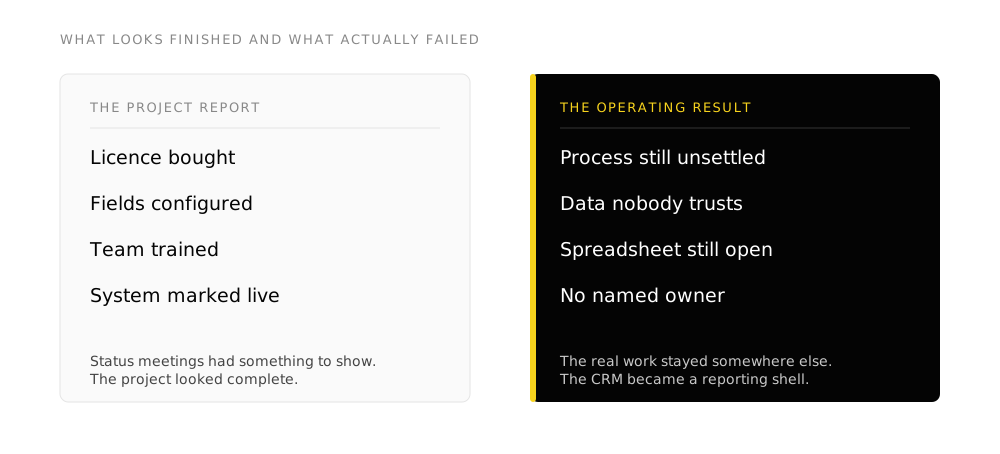
CRM implementations fail because businesses buy a tool before they understand their own process. The licence is bought, fields are configured, and the team is trained on screens that encode a process nobody finished agreeing. Six months later the spreadsheet is still the system of record, and the CRM gets the blame.
The software usually did what it was asked. The ask was incomplete.
TL;DR
- Failure shows up as an operating result: an abandoned CRM, a live spreadsheet beside it, or a pipeline nobody trusts.
- Starting at configuration before the process is agreed looks like progress and encodes one room's version of the work.
- Five causes recur: unsettled process, untrusted data, a scope that ends at go-live, feature-led training, and no named owner afterwards.
- Replacing the CRM reproduces the result when those five stay untouched. A new licence does not rewrite the process.
- Fix the process, then build the system. Write the process, prepare the data, then configure. FusionMap scopes that work. Systems Build runs it. Systems Rescue restarts a CRM that already failed.
What failure looks like
A failed CRM implementation rarely looks like a crashed system. The login still works. Seats are assigned. Somebody still opens it for a report once a month.
What failed is the operating result:
- The team keeps the real work in a spreadsheet, inbox or notebook because that is where they trust the record.
- Pipeline stages mean different things to different people, so every forecast is an argument.
- Duplicate contacts pile up until nobody will send from the CRM without checking somewhere else first.
- New hires get a feature tour and then ask a colleague how the work actually runs.
Digital adoption, and what that means here, is getting people to use the system as the place the work happens, against a process they recognize.
Starting at configuration
The most common failure is building fields, layouts and stages before the process is written down and agreed. The project looks busy. Screens appear. Status meetings have something to show. The organization is still arguing about who owns a lead, what “qualified” means, and which version of a customer record is true.
The system that ships encodes whichever answers were in the room that week. People who missed those meetings discover the mismatch after go-live, and they keep the work somewhere else.
Configuration belongs after process definition and data preparation. Starting there because it feels like progress is the expensive sequencing error. The stage-by-stage sequence is in the CRM implementation guide.
Five causes that show up after go-live
1. The process stayed in people’s heads
Stages, ownership, exceptions and handoffs lived as habit rather than as a written map. Configuration then became a negotiation conducted inside the software. Two people doing the same job would have described different steps. The CRM picked one version and called it done.
A written process map, agreed by the people who run it, is the input to configuration. Without it, every later change reopens the argument about how the work runs.
2. The data skipped the business decisions
Migration treated as an IT file transfer moves the mess into a nicer interface. Deduplication, which record is authoritative, and what to leave behind are business decisions. When those stay unsettled, the team learns the CRM is wrong on day three and stops trusting it on day four.
How to move records without moving the mess is covered in CRM data migration.
3. The scope ended at go-live
Go-live is a milestone. Adoption is a period after it where usage is checked, the design is corrected against what people actually do, and the old spreadsheet is retired on a date with a name attached to it. Cut that period and the previous stages get abandoned in practice even when they were built correctly.
4. Training covered features instead of roles
A salesperson needs their five screens and the decisions those screens support. A feature tour produces people who have seen everything and can do nothing. How to drive digital adoption covers the levers that move usage after the system exists, including mandate, making the path easier, and removing the old way.
5. Nobody was named as owner afterwards
One person inside the organization has to know the configuration, make a change when a field turns out wrong, and be expected to. Without that, month-three friction becomes a permanent workaround. The partner can leave a handover. Ownership has to sit inside the company.
The test after month three
Ask where a new deal is written first, where a phone number is corrected, and who changes a pipeline stage definition. If the answers point at a spreadsheet, an inbox or "whoever remembers", the CRM is a reporting shell. The real system of record is somewhere else.
Why a replacement CRM usually fails the same way
Buying a second CRM feels like a clean start. The process is still unsettled. The data is still untrusted. Ownership is still missing. The new system inherits the same unfinished work and arrives with a migration bill on top.
That is why Systems Rescue exists as a separate entrance from a fresh build. A CRM that already failed needs the process and data cleaned before another configuration pass. See Systems Rescue.
When the operating picture is already split across standalone systems, the same order applies: map the work and the data before another configuration pass. That is the shape of the legal operations digital readiness engagement: fragmented databases and manual workflows scored first, then a phased roadmap for documents, workflow, data and reporting.
The sequence that holds
- Write the process. Stages, owners, exceptions, and what has to be true before something moves.
- Prepare the data. Deduplicate, decide which record is true, choose what to leave behind.
- Configure against that process. Fields, layouts, permissions, automation and reports that match the work.
- Integrate where the same fact is entered twice. Build connections that remove duplicate entry.
- Migrate, train by role, retire the old way on a date.
- Run a correction period with a named owner. Measure records created at the right stage and workflow use.
When the process still needs writing, start at FusionMap. When the platform is chosen and the process is clear, start at Systems Build. When the last CRM already failed, start at Systems Rescue.
- Starting at configuration because it produces screens you can show in a status meeting
- Treating migration as a file copy rather than a set of decisions about which record is true
- Calling the project finished at go-live while the spreadsheet stays editable
- Training on the whole platform instead of the screens each role uses
- Leaving ownership with the implementation partner after they leave
- Replacing the CRM to fix an unsettled process
Frequently asked questions
What is the most common reason a CRM implementation fails?
The process stayed undefined, so the system encodes a version of it that only one room agreed to. Untrusted data is the close second. Both sit upstream of the software.
How do you know a CRM implementation has already failed?
The team still writes the real work somewhere else. Pipeline meanings disagree. People check a second source before they trust a record. Logins can stay high while all of that is true.
Should we replace our CRM or fix the one we have?
Fix the process and the data first. If the platform can hold that process, rescue it. If the platform is genuinely the constraint after the process is written, then change platforms. Starting with a replacement licence usually buys a second copy of the same failure.
Can we recover a failed CRM without starting over?
Often yes. The work is process agreement, data cleanup, role-based retraining, and a named owner, then a controlled correction period. That is what Systems Rescue is for.
Where does digital adoption fit?
Adoption is the operating outcome: people use the CRM as the place the work happens. Configuration is one input. Training, mandate, retiring the old way and ownership are the others. See what digital adoption is and how to drive it.
How long should we leave for the period after go-live?
Long enough to correct the design against real use and to retire the old spreadsheet on a date. Cutting that period to save budget is how a technically complete system becomes an unused one.
Takeaways
- CRM implementations fail when the project starts at the software. The ask was incomplete.
- Starting at configuration before the process is agreed looks like progress and ships disagreement.
- Process, data, post-go-live correction, role-based training and a named owner decide the outcome more than the licence.
- A replacement CRM reproduces the result when those five stay unfinished.
- Write the process, prepare the data, then configure. Map, build or rescue depending on where you already are.